How to Promote Your YouTube Videos with Paid Media (Without Burning Money)


How to Promote Your YouTube Videos with Paid Media (Without Burning Money)
You can promote any YouTube video through paid ads. The question is not whether you can. It is whether you should promote that particular video, and most channels pick the wrong one.
Promoting a video that already holds attention organically puts money behind something proven. Promoting a video that nobody watches past the first 20 seconds just accelerates the failure. YouTube does not care that you paid. If the content does not retain viewers, paid reach will not fix it.
Which video to promote, and this is where most channels go wrong
Do not promote your newest video because it is new. Do not promote your favourite video because you like it. Do not promote the one that took the longest to make. None of these are selection criteria.
Open YouTube Studio. Sort by audience retention. The videos where viewers stick around longest are your candidates. A video with 50 percent average view duration will perform dramatically better as a paid promotion than one sitting at 25 percent. This is not a marginal difference. It determines whether your money reaches people who engage or people who skip within seconds, costing you the view fee and giving you nothing in return.
CTR matters too. If the thumbnail and title already earn clicks organically, they will earn clicks in paid placements. If organic CTR is below 3 percent, the packaging probably needs work before you pay to show it to more people. Spending money to put a weak thumbnail in front of a larger audience is like turning up the volume on a bad song.
The ideal promotion candidate is a video with above-average retention, strong organic CTR, and content that naturally leads somewhere useful, whether that is your channel page, a playlist, or a series that keeps new viewers watching more.
YouTube Promote vs Google Ads: which to use
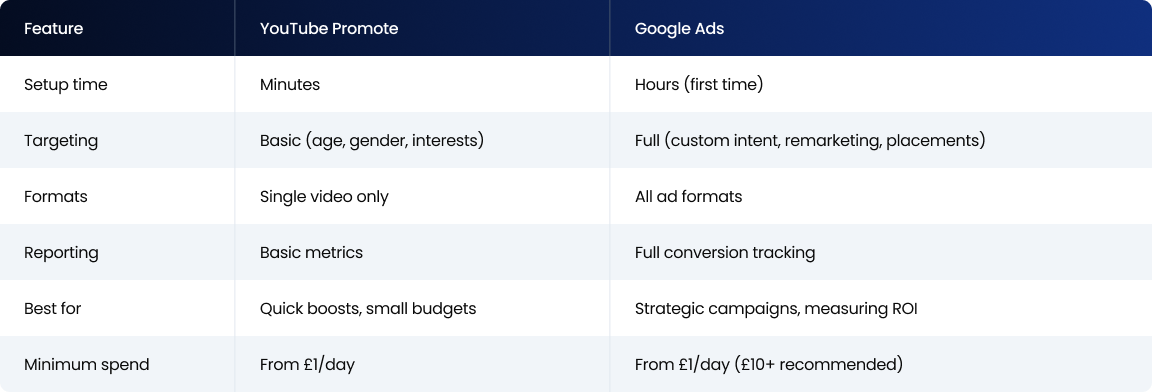
YouTube Promote lives inside YouTube Studio. Quick, simple, limited. Pick a video, choose a goal, set a budget, done. You cannot build custom intent audiences or set up remarketing. It is fine for a quick visibility boost on a small budget but that is about where its usefulness ends.
Google Ads is the full toolkit. Every targeting option YouTube offers: demographics, interests, custom intent audiences targeting people who searched specific terms on Google recently, in-market audiences, remarketing lists of previous viewers, lookalikes, topic targeting, keyword targeting, and placement targeting where you choose specific channels or videos for your ad to appear alongside. Detailed reporting. Conversion tracking. A/B testing across creative variations.
For anything beyond wanting a video to get more views this week, Google Ads is worth the setup time. The targeting options alone make a measurable difference to cost per subscriber and cost per engaged viewer.
Getting the campaign right
Start with the objective. What do you actually want this promotion to produce?
Subscriber growth and channel discovery work best with skippable in-stream or in-feed ads. You pay per view so budget goes toward people who actively chose to engage. Content awareness with guaranteed exposure works better with bumper or non-skippable formats which ensure your full message gets seen. Driving viewers into a specific playlist or series works well with in-feed ads that put your thumbnail directly in front of people browsing related content.
Wrong format for the wrong objective wastes money quietly. A format optimised for impressions will never drive subscriptions efficiently no matter how good the creative is. Match the format to what you are actually trying to achieve.
On targeting, start narrow and widen. Custom intent audiences of people who searched relevant terms recently and remarketing lists of people who have already watched your content are your warmest audiences. They subscribe at the highest rate. Validate that your video works with these groups before expanding to broader interest-based or demographic targeting. Going broad from day one is how channel growth budgets evaporate on people who were never going to subscribe.
Set up conversion tracking before you launch. Define what counts as a success. Subscribers gained. Playlist starts. Channel page visits. Running a promotion without tracking what it actually produces is running blind.
Budget at £15 to £20 per day for two weeks gives you enough data to evaluate properly. Do not scale until you can see a clear signal.
What happens after you hit promote
Views go up during the campaign. That is the obvious part.
All views and subscribers gained through paid promotion are legitimate. A promotion can introduce someone to your channel, and if you keep publishing consistently, they will stick around. That relationship is real.
Watch for view rate dropping compared to your organic performance. If organic viewers watch 60 percent of the video but promoted viewers only watch 20 percent, you are bringing in the wrong audience. Tighten the targeting or swap in a different video. Some drop-off between organic and paid viewer behaviour is normal because not everyone who sees a paid ad is as invested as someone who found you through search. But if the gap is significant the targeting needs work.
The mistakes that eat channel growth budgets
Promoting videos that do not perform organically. If the content cannot hold attention on its own, paid attention will not change that. You are just paying to discover a problem faster.
Promoting into a channel with nothing else on it. The promoted video might hook someone, but if they click through to your channel and find a thin library with inconsistent uploads, that visit goes nowhere. The channel needs depth to convert curiosity into subscription.
Going big without testing. Two weeks at a low budget teaches you more than two days at a high budget. The data from testing is worth more than the views from guessing.
Ignoring what happens after the view. At The Polar Bears, every paid promotion we set up has tracking built in from day one. Not because we are obsessive about data, though we are, but because views without downstream action are expensive vanity metrics. Connecting promotions to subscriber growth, watch time increases, and returning viewer rates separates useful promotion from noise.
Not testing different creatives. The same video can perform differently with different thumbnails, different CTA overlays, and different audience segments. Most promotions run one version and call it done. Running two or three variations costs the same total budget but tells you which version of your message actually lands with the audience you are trying to reach.
FAQ
Can I pay YouTube to promote my videos?
Yes, two ways. YouTube Studio has a built-in Promote feature that's simple and quick. Google Ads gives full control over targeting, formats, and conversion tracking. Both let you set your own budget from as little as £1 per day, though £10+ is recommended for meaningful results.
Is it worth paying to promote a YouTube video?
Depends entirely on which video you pick. Videos with strong organic retention and good CTR get the most from paid promotion because the content already works. Promoting a video that doesn't hold attention organically just wastes money faster. Promote your proven winners, not your hopeful ones.
How much does it cost to promote a YouTube video?
Skippable ads cost £0.01-£0.10 per view. Reaching 100,000 views runs roughly £1,000-£10,000 depending on targeting and industry. YouTube's Promote feature lets you start with a few pounds a day. Shorts promotions run cheaper at £2-£6 CPM.
What will happen if I promote my video on YouTube?
Your video gets shown as an ad to people matching your targeting. Views increase during the campaign. Those views and any subscribers gained are legitimate and count toward your channel metrics. Whether that translates to long-term growth depends on whether the content is good enough to make new viewers want to come back.
Should I promote every video or just some?
Just some. Promoting every video spreads budget too thin and inevitably pushes money behind content that doesn't deserve the boost. Focus paid budget on your highest-retention, highest-CTR videos that lead naturally toward a business outcome. Be selective.
What's the difference between YouTube Promote and Google Ads?
YouTube Promote is the simplified version inside YouTube Studio. Quick setup, basic targeting, single video focus. Google Ads is the full platform with advanced targeting (custom intent, remarketing, specific channel placements), multiple ad format options, A/B testing, and detailed conversion tracking. Most businesses that get serious about promotion move to Google Ads for the targeting depth.
Want a paid promotion strategy built for your channel?
If you liked that why not take a look

YouTube Content ID Explained: How Rights Holders Protect and Monetise Their IP
What YouTube Content ID is, who gets access, and how rights holders use it to protect and monetise content. Payouts, policies and pitfalls explained.
What Security and Compliance Should a YouTube Agency Have?
Your agency holds your accounts and data. What SOC 2, ISO 27001, GDPR and Cyber Essentials actually mean, and what to ask before you sign.
Should Your YouTube Agency Work With Your Competitors?
Your agency might run your rival's channel too. Why agency conflict of interest matters, how good agencies keep competing clients apart, and what to ask.
What Should a YouTube Agency Put in Writing?
Most YouTube agencies dodge written commitments. What a good agency should promise: response times, reporting cadence, and fixing underperforming videos.
What Data Can You Take When You Leave a YouTube Agency?
Can you take your analytics, dashboards and custom reports when you leave a YouTube agency? What data is yours, what is not, and how to avoid lock-in.
Who Owns Your YouTube Channel When You Use an Agency?
You should own your YouTube channel, not your agency. How channel ownership works, owner vs manager access, and how to keep control on exit.

Ready to maximise your YouTube revenue?
Get in touch and let’s begin exploring your channel’s hidden potential.