What It Actually Costs to Run a 24/7 Channel vs Standard Uploads

What It Actually Costs to Run a 24/7 Channel vs Standard Uploads
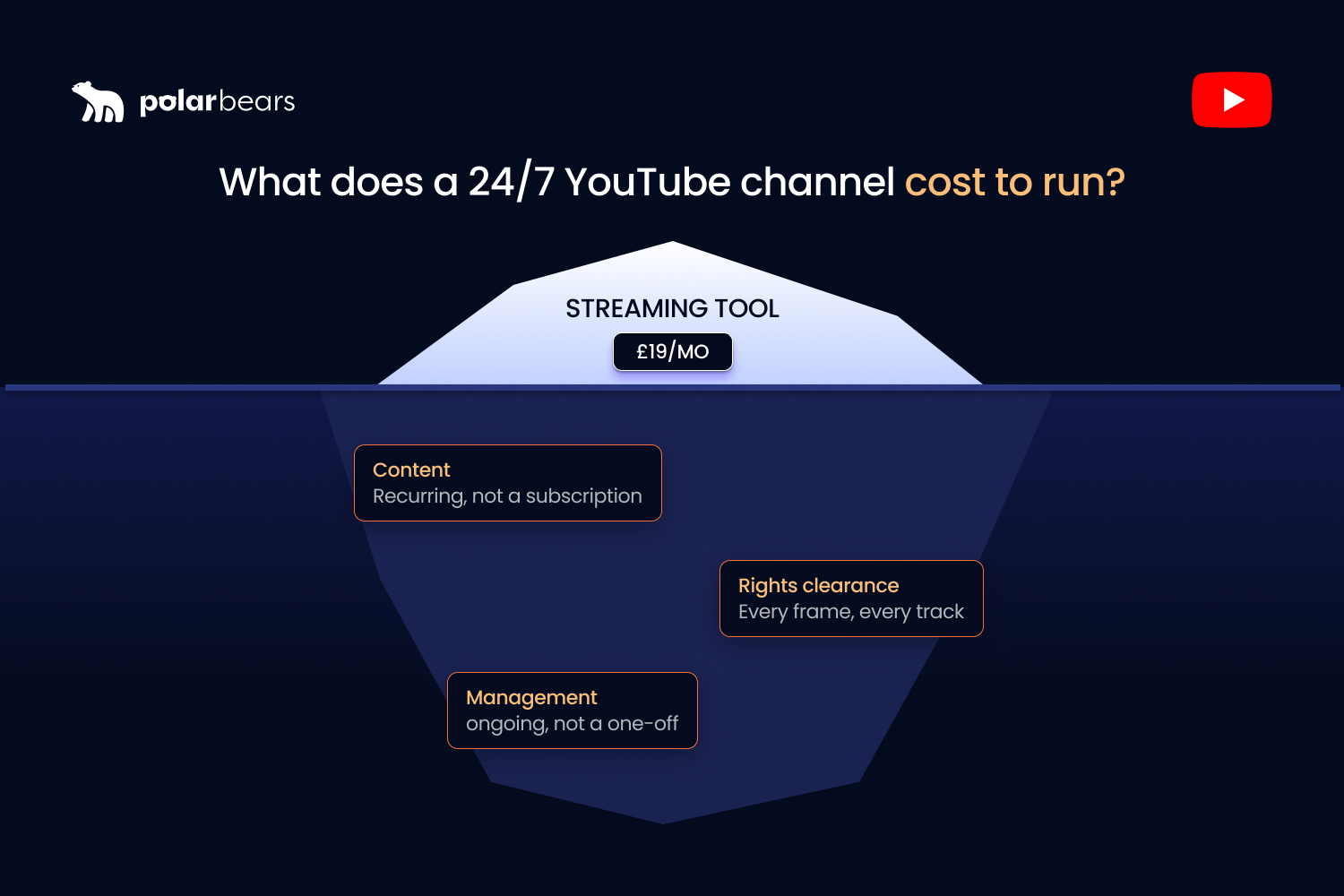
A 24/7 stream costs about as much as a streaming subscription. That number is real, it is small, and it is the wrong number to budget on.
Here is how brands get caught. They price the encoder, see something like £19 a month, decide an always-on channel is basically free, and launch one. Then the real bill arrives: the content to fill the loop, the rights behind that content, and the people programming and managing the thing. None of that was in the spreadsheet.
Short version: the streaming part is almost free, and the streaming part is not the cost. This guide prices the whole channel properly, the cheap infrastructure and the expensive bits, and then puts an always-on channel next to standard uploads so you can see which actually uses your budget better.
The cost myth: streaming is cheap, running a channel is not
Search the cost of a 24/7 channel and you get the price of the streaming tool. That figure is real but tiny, and it is not where the money goes.
Going live on YouTube itself is free. The infrastructure to keep a stream up runs at subscription or server prices. The genuine cost sits in three places the tool comparisons rarely mention. The content you stream. The rights to stream it. The time to programme and manage the channel as a product. Price only the first and you will underbudget by an order of magnitude, then wonder why the maths never worked.
The streaming infrastructure cost
This is the cheap part, and it is worth knowing the options, because they price very differently.
Running it yourself
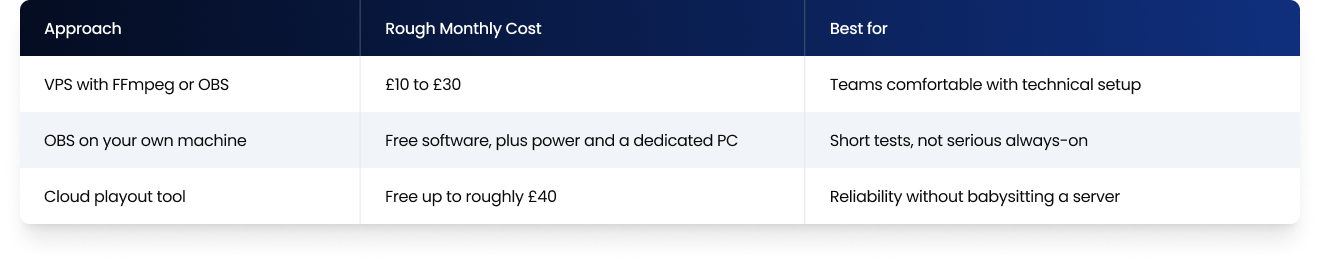
A virtual private server running FFmpeg or OBS can loop your content around the clock. A 24/7 stream typically needs a VPS in the £10 to £30 a month range, with a mid-tier box handling 1080p comfortably. The trade-off is setup and maintenance. Running OBS on your own machine instead is possible, but it means leaving a computer on permanently, which adds power cost and the risk of one crash taking the stream down at 3am.
Cloud streaming tools
Cloud playout services run the stream from their own servers, with nothing left on. Restream and similar tools price from free up to around £40 a month for the tiers an always-on channel typically needs, and other cloud streamers price by stream count and resolution. You pay a little more than a bare VPS, and you buy back reliability and a browser you can actually use.
Whichever you pick, the infrastructure is a rounding error against the rest of the budget. That is the whole point of this article.
The real cost: content and rights
Here is where the money actually goes, and it is the part you cannot subscribe your way out of.
An always-on channel needs hours of content in the loop, ideally a deep, refreshed library rather than a thin clip repeated until YouTube flags it. Already own a back catalogue? Your marginal content cost is low, which is exactly why broadcasters, labels and rights holders are best placed to run this model. Starting from scratch? Producing enough quality content to fill a credible schedule is a real production budget, not a subscription.
Rights clearance sits right next to it. Every frame and every track in the loop has to be yours or licensed, because content you do not own draws copyright claims that interrupt the stream or swallow the revenue. For archive content, confirming you hold the online and territorial rights is a proper workstream, not a tick-box. This is the cost that quietly sinks underfunded always-on channels. They fill the loop with material they cannot legally monetise, and only find out when the claims land.
The real cost: programming and management
A channel is more than a playlist on a timer. It is a product that needs running, and that is a recurring cost in people, not software.
Someone has to programme the schedule, refresh the loop so it stays compliant and fresh, package the stream so viewers know what they are tuning into, restart sessions so they save as on-demand video, and watch the analytics to see what is working. Across a portfolio of channels, that becomes a real operational load. It is the same load that makes channel management a defined cost line for brands serious about YouTube, in-house or outsourced.
Standard uploads: what they actually cost
To compare fairly, you have to price uploads properly too, because they are not free either.
A standard upload carries a per-video production cost. Filming or making it, editing, packaging, publishing. There is no streaming subscription and no always-on infrastructure, but every video is a fresh unit of work, and a channel that posts consistently pays that cost again and again. The infrastructure is zero. The content cost is everything, and it recurs with every upload instead of being spread across a continuous stream.
Like-for-like: always-on vs uploads
The useful question is not which is cheaper in the abstract. It is which one gets more out of the content you already have.
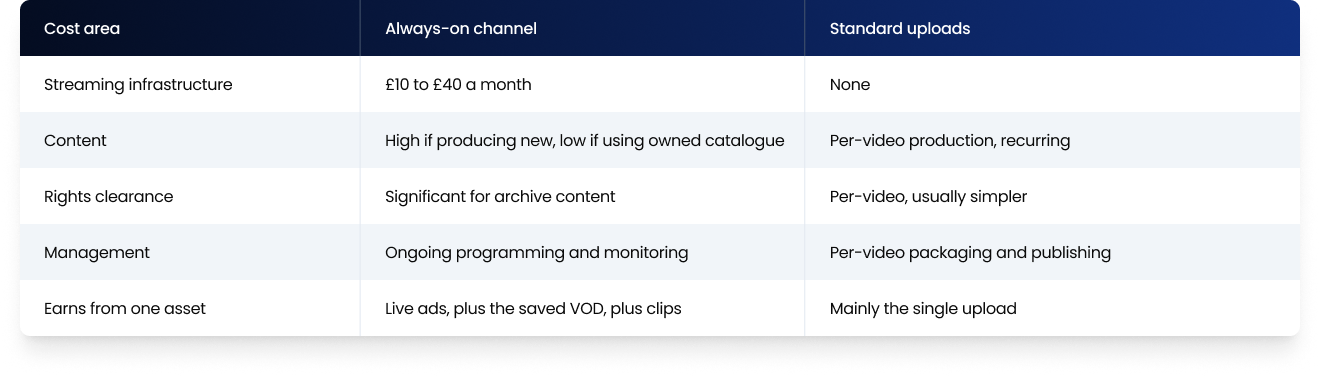
The pattern is clear. Own a deep catalogue and always-on spreads a low marginal content cost across a continuous, multi-earning stream, which is efficient. Produce everything fresh and uploads may be the better use of budget until you have a library worth looping. The deciding factor is the catalogue, not the streaming bill.
When always-on is worth it, and when uploads win
The honest answer is that it depends on what you already have, and it is worth being clear about both directions.
Always-on is worth it when you own a back catalogue that is otherwise idle, when your content suits lean-back viewing such as sport, music, kids or news, and when you can resource the programming and rights work to do it properly. In that case it turns finished assets into a continuous earner and a permanent presence, and the streaming cost is trivial against the upside.
Uploads win when you do not yet have a library deep enough to fill a credible loop, when your content is built for active rather than lean-back viewing, or when you cannot resource the management an always-on channel needs. A thin, unmanaged 24/7 stream is worse than no stream at all, because it risks the inauthentic-content line and earns little. Sometimes the right move is to build the upload library first and add always-on once there is a catalogue worth streaming. Running both is also valid, using the distribution model that spreads content across formats.
Costing it properly at scale
Always-on budgets go wrong because the visible cost, the streaming tool, is the smallest line, and the real costs, content, rights and management, are easy to wave away until they show up. Price the whole thing up front, then track what the channel actually earns against what it costs to run. That is the only way to know whether it is working, or just running.
That tracking is harder than it sounds across a stream, the on-demand video it produces, and the ad revenue underneath. At The Polar Bears, the reporting behind it is Powered by Vixxi, the platform we license to consolidate YouTube, Google Ads, and Google Ad Manager into one workflow. For the broadcasters and publishers we work with, it puts cost and revenue side by side, so an always-on channel is judged on its real return, not its streaming subscription. Cheap to stream is not the same as cheap to run, and the difference is the whole decision.
FAQ
How much does it cost to run a 24/7 YouTube live stream?
The streaming infrastructure is cheap. Roughly £10 to £30 a month for a VPS, or free up to around £40 a month for a cloud tool. The real cost is the content in the loop, clearing the rights to stream it, and the time to programme and manage the channel, which is where the budget actually goes.
Is it free to live stream on YouTube?
Going live on YouTube is free. You pay for the software or server that keeps a 24/7 stream running, not for the platform. A short live test costs nothing beyond an encoder, but a continuous always-on channel needs reliable infrastructure and, more importantly, content and management.
Do you need a VPS or server to stream 24/7?
You need something that can keep the stream running continuously. A VPS running FFmpeg or OBS is the self-managed route, while a cloud playout tool runs the stream from its own servers with nothing of yours left on. Running OBS on your own computer works for tests but is fragile for a permanent channel.
Is it cheaper to run an always-on channel or post standard uploads?
It depends on your content. Own a deep back catalogue and an always-on channel spreads a low content cost across a continuous, multi-earning stream, which is efficient. Produce every video fresh and uploads may use budget better until you have a library worth looping. The catalogue decides it, not the streaming cost.
What hidden costs come with a 24/7 channel?
The ones the tool comparisons skip. Producing or sourcing enough content to fill the loop, clearing rights so everything is legally monetisable, and the ongoing work of programming, refreshing, packaging and monitoring the channel. These dwarf the streaming subscription, and they are where underfunded always-on channels fail.
Do you need expensive software to stream pre-recorded video?
No. OBS is free, a VPS is inexpensive, and cloud playout tools start free and scale to modest monthly fees. The software is the cheapest part of an always-on channel. Spending the budget on content, rights and management matters far more than the encoder you choose.
Want to know what an always-on channel would really cost and earn for you?
If you liked that why not take a look

Copyright Claims vs Strikes: What Brands and Broadcasters Need to Know
Copyright claims and strikes are not the same thing. What each does to your channel, when to dispute, and how brands manage copyright risk at scale.
YouTube Content ID Explained: How Rights Holders Protect and Monetise Their IP
What YouTube Content ID is, who gets access, and how rights holders use it to protect and monetise content. Payouts, policies and pitfalls explained.
What Security and Compliance Should a YouTube Agency Have?
Your agency holds your accounts and data. What SOC 2, ISO 27001, GDPR and Cyber Essentials actually mean, and what to ask before you sign.
Should Your YouTube Agency Work With Your Competitors?
Your agency might run your rival's channel too. Why agency conflict of interest matters, how good agencies keep competing clients apart, and what to ask.
What Should a YouTube Agency Put in Writing?
Most YouTube agencies dodge written commitments. What a good agency should promise: response times, reporting cadence, and fixing underperforming videos.
What Data Can You Take When You Leave a YouTube Agency?
Can you take your analytics, dashboards and custom reports when you leave a YouTube agency? What data is yours, what is not, and how to avoid lock-in.

Ready to maximise your YouTube revenue?
Get in touch and let’s begin exploring your channel’s hidden potential.