YouTube Content Calendar: How to Plan 12 Months (2026)

YouTube Content Calendar: How to Plan 12 Months
A YouTube content calendar isn't a publishing schedule. It's a system for translating audience demand into the right videos at the right cadence, with enough lead time to produce them well. Channels that plan 12 months ahead consistently outperform channels that improvise, because consistency, batching, and seasonal alignment compound into ranking signal that ad-hoc publishing never builds.
The structure that works in 2026 has four layers: an annual theme that anchors the channel's positioning, quarterly content pillars that map to audience demand, monthly slot allocations that mix evergreen and trending, and weekly slots that spell out what gets filmed, edited, and uploaded. Get the layers right and the calendar plans itself from quarter two onward.
Why Content Calendars Matter for YouTube Specifically
YouTube punishes inconsistency more than most platforms because the algorithm reads upload patterns as a freshness signal, and audiences build expectations around your cadence. Subscribers learn when to come back. None of that compounds without planning.
The gains from planned content versus ad-hoc are measurable. The reasons stack: better keyword targeting, less last-minute filming compromise, more time to produce thumbnails and titles properly, and the ability to batch shoot and batch edit, which raises the average quality of every output. Our breakdown of how often you should post on YouTube covers the cadence side in detail.
Production lead time matters more than most creators realise. A video shot the week it's published always loses to a video shot four weeks before, simply because the second one had time to be revised, re-shot in places, and packaged carefully.
The Hero / Hub / Help Model Applied to YouTube
Google's Hero / Hub / Help model is one of the cleanest frameworks for YouTube content planning in 2026. It maps to how viewers actually discover and use channels.
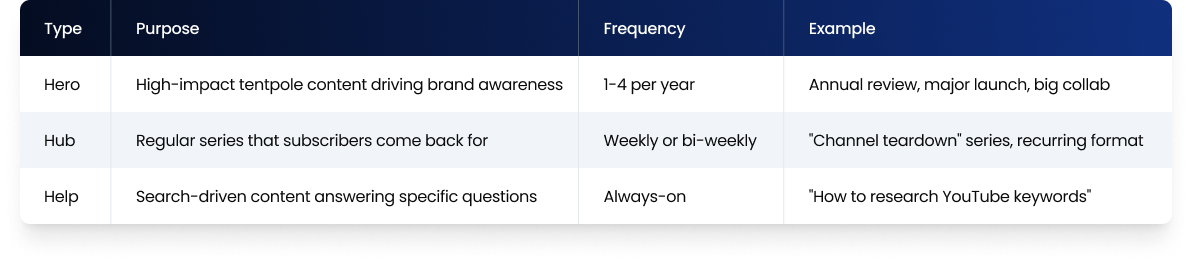
The mix that works for most brand and creator channels is roughly 10% hero, 30% hub, 60% help. The 60% help content does the heavy lifting on search and AEO citations. The hub content builds subscriber loyalty. The hero content earns reach and brand mentions.
Channels that go 100% on any single layer underperform. All-help is invisible to existing subscribers. All-hub builds a small loyal base but never grows. All-hero burns out the team and produces nothing in the gaps.
Posting Frequency in 2026: What the Data Says
Posting cadence still matters, but consistency outweighs raw frequency. The bigger predictor of growth is whether you publish on a predictable schedule, not how often.
The realistic 2026 ranges:
For long-form content, one to three videos per week is the sweet spot for most brand channels. Weekly is the floor that signals consistency to the algorithm. Daily long-form is achievable only with significant production resources and usually only sustainable for established channels.
For Shorts, three to seven per week is the pattern for channels using Shorts as a discovery and growth engine. Daily Shorts works in many niches and is often the cleanest growth lever for newer channels.
For livestreams, monthly to weekly depending on the role livestreams play in the strategy. For brands, livestreams often work as monthly events tied to product launches or community moments.
The single biggest mistake is announcing a cadence and missing it. A channel uploading reliably every Tuesday at 4pm builds expectation that compounds. The same channel posting four times one month and once the next undermines its own algorithmic momentum.
Annual, Quarterly, Monthly, Weekly Planning
A 12-month calendar works in nested layers:
The annual layer sets the theme. What is this channel going to be known for over the next 12 months? Pick three to five topical pillars that the channel will own. Everything else fits underneath.
The quarterly layer maps demand. Each quarter, identify the seasonal moments, industry events, and predictable demand spikes that the channel should be visible for. Plan hero pieces around these. Q1 might be tied to "new year strategy" content. Q4 might be tied to year-end reviews and predictions.
The monthly layer allocates slots. Each month gets a fixed number of slots split across hero, hub, and help. A channel publishing twice a week has 8-9 slots per month. A reasonable allocation might be one hero per quarter, one hub video per week, and the rest filled with help content.
The weekly layer spells out execution. Specific titles, target keywords, scripted hooks, scheduled film dates, edit dates, thumbnail brief due dates, and publish dates. This is the level where the calendar becomes operational.
Mapping Keywords to Content Slots
Once you have a slot structure, translate keyword research into specific videos. The workflow:
1. Pull your keyword cluster list from quarterly research.
2. Sort by intent. Help content uses informational and commercial keywords. Hub content uses recurring topical keywords. Hero content uses broad-topic keywords plus event-driven trends.
3. Assign keywords to monthly slots based on demand seasonality. Tax-related content goes in Q1. End-of-year content goes in Q4.
4. Avoid cannibalisation. If two videos target overlapping keywords, the algorithm splits the ranking signal between them and neither performs well. One keyword cluster equals one video.
5. Leave 20% of slots open for trending topics that will appear during the quarter. A calendar with no flex breaks the moment news happens.
Batch Production: The Multiplier Most Channels Skip
Batching is the operational lever that lets a calendar actually run. Two patterns work consistently:
Filming in batches. A single film day producing three to five videos costs less than half what five separate film days cost in time and energy. The setup, lighting, and warm-up overhead happens once.
Editing in batches. Editing five videos in a focused two-day block produces higher consistency than editing one video at a time across five separate days. Templates get refined, transitions get reused properly, and pacing decisions get more deliberate.
The realistic gain from batching is roughly 40-50% time saved on production for channels that batch monthly versus channels that produce one video at a time. The quality usually goes up too, because batching forces decisions to be made in advance rather than during the production itself. We covered the mindset shift in our post on maximising every piece of content you create.
Planning Tool Comparison
The tool you use matters less than the discipline you apply. That said, the realistic 2026 stack:
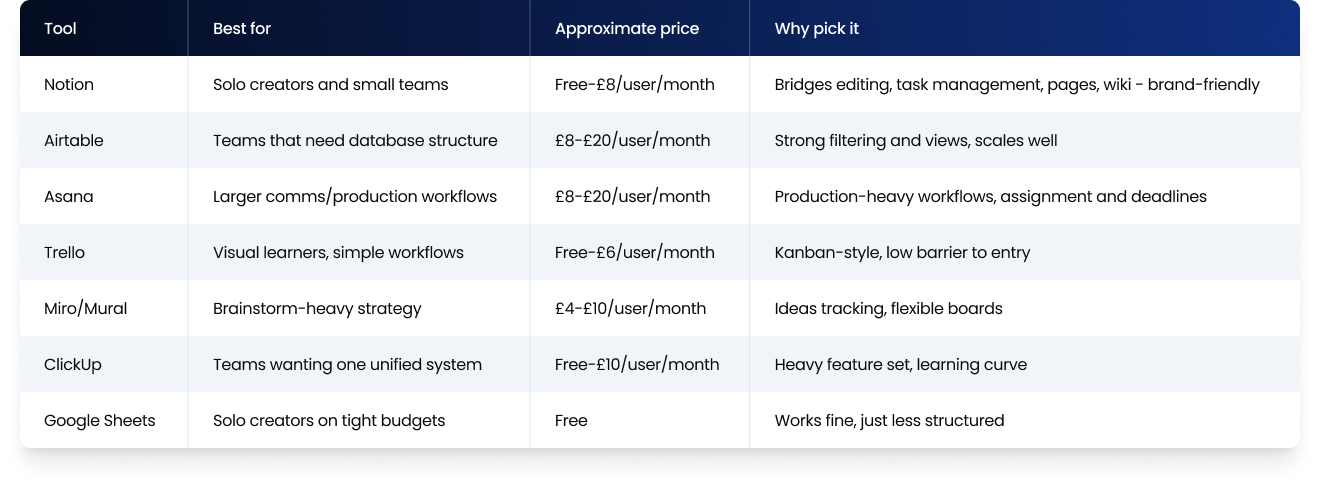
For most channels, Notion or Airtable handles 95% of what's needed. Larger production teams running shoots, edits, and approvals across multiple people involved usually move to Asana or Monday.
Iterating the Calendar With Performance Data
The calendar shouldn't be static. A 90-day review cadence catches what's working and what isn't:
Every 30 days, look at the videos published in the last 30. Which exceeded benchmarks? Which underperformed? Note the patterns.
Every 90 days, redo keyword research, refresh the monthly slot allocation, and update which topics are saturated versus open.
Every 12 months, redo the annual theme. Audience interests shift. What anchored the channel last year may be played out by Q4.
Underperformers are signals, not failures. A help video with weak retention usually means the keyword had wrong intent or the format didn't match the query. A hero piece that underperforms usually means the cultural moment didn't land. Document the lessons and the next quarter benefits.
At The Polar Bears, our Channel Management service runs 12-month calendars across the channels we manage, with monthly performance reviews built into the workflow. The pattern we see is consistent: the channels that grow are the ones treating the calendar as a living document, not a Q1 spreadsheet that gathers dust by April.
Mistakes That Quietly Sink Content Calendars
The patterns that show up most:
Planning all evergreen, no flex. A calendar with zero room for trending topics breaks the first time news happens.
Planning all trending, no evergreen. Zero compounding. Every video starts from zero search demand the moment the trend dies.
Skipping batching. Filming in real-time burns out small teams within three months.
Not assigning slots to research. Keyword research and topic ideation need their own calendar slot. Channels that skip this run out of validated topics around month four.
Building the calendar in a tool no one opens. The calendar lives in the team's daily workflow or it doesn't exist.
FAQ
How far ahead should I plan my YouTube content?
Plan 12 months at the theme level, 90 days at the slot level, and 30 days at the operational level. The 12-month view sets channel direction. The 90-day view assigns specific topics to slots. The 30-day view spells out filming, editing, and publish dates with enough lead time to produce videos well rather than reactively.
How often should I post on YouTube in 2026?
For most brand channels, one to three long-form videos per week is the realistic 2026 cadence. Daily Shorts works as a growth engine in many niches. The biggest predictor of growth isn't raw frequency but consistency: a channel uploading reliably every Tuesday outperforms a channel that posts four times one month and once the next.
What's the best tool for a YouTube content calendar?
Notion and Airtable handle 95% of what most channels and small teams need. Notion is more flexible for solo creators and small teams. Airtable scales better for teams that need database structure and filtering. Larger production teams running shoots and approvals across multiple people involved often move to Asana or Monday.
How do I plan a YouTube content calendar around seasonality?
Map each quarter to predictable demand peaks in your industry. Q1 usually carries new-year and planning content. Q2 often anchors around mid-year reviews and summer themes. Q3 is preparation content. Q4 covers year-end reviews and predictions. Plan hero pieces around the seasonal peaks specific to your niche.
What is the Hero / Hub / Help model for YouTube?
The Hero / Hub / Help model splits content into three categories. Hero is high-impact tentpole content for awareness, published 1-4 times per year. Hub is recurring series content for subscriber retention, weekly or bi-weekly. Help is search-driven content answering specific questions, published always-on. The mix that works for most channels is roughly 10% hero, 30% hub, 60% help.
Should I batch produce my YouTube videos?
Yes, batching saves around 40-50% of production time compared with producing one video at a time, and usually raises consistency. Filming three to five videos in a single setup eliminates the repeated overhead. Editing in two-day focused blocks produces tighter pacing and reusable templates. Most successful brand channels and creators batch at the monthly level minimum.
How do I balance evergreen and trending content on YouTube?
The mix that works for most channels is roughly 70% evergreen and 30% trending. Evergreen content compounds: the same video gets searches in March that it gets in October. Trending content delivers fast wins and signals freshness to the algorithm. Going 100% on either is a slower path than the mix.
If you liked that why not take a look

Copyright Claims vs Strikes: What Brands and Broadcasters Need to Know
Copyright claims and strikes are not the same thing. What each does to your channel, when to dispute, and how brands manage copyright risk at scale.
YouTube Content ID Explained: How Rights Holders Protect and Monetise Their IP
What YouTube Content ID is, who gets access, and how rights holders use it to protect and monetise content. Payouts, policies and pitfalls explained.
What Security and Compliance Should a YouTube Agency Have?
Your agency holds your accounts and data. What SOC 2, ISO 27001, GDPR and Cyber Essentials actually mean, and what to ask before you sign.
Should Your YouTube Agency Work With Your Competitors?
Your agency might run your rival's channel too. Why agency conflict of interest matters, how good agencies keep competing clients apart, and what to ask.
What Should a YouTube Agency Put in Writing?
Most YouTube agencies dodge written commitments. What a good agency should promise: response times, reporting cadence, and fixing underperforming videos.
What Data Can You Take When You Leave a YouTube Agency?
Can you take your analytics, dashboards and custom reports when you leave a YouTube agency? What data is yours, what is not, and how to avoid lock-in.

Ready to maximise your YouTube revenue?
Get in touch and let’s begin exploring your channel’s hidden potential.