Multi-Channel YouTube Reporting Without a CMS: Ops for Networks with 5+ Channels

Multi-Channel YouTube Reporting Without a CMS: Ops for Networks with 5+ Channels
Most operators managing five or more YouTube channels assume they need CMS access to report properly across the portfolio. The honest answer is they probably cannot get it, and they do not need to.
YouTube's Content Management System is invitation-only and reserved for multi-channel networks, major media companies, and rights holders with significant copyrighted libraries. Everyone else has to build multi-channel reporting outside the platform. The workaround stack that works in 2026 is mature, well-documented, and runnable today, but it has real limits worth understanding before you select an approach.
This guide covers who actually qualifies for CMS, what breaks when you try to run multi-channel ops from YouTube Studio alone, the API-based stack that replaces most of what CMS would do, and the honest framing of building it yourself versus partnering with an agency that already has the infrastructure in place.
Who actually gets YouTube CMS in 2026
CMS is the most-asked-about and least-understood part of YouTube's platform for network operators. Before you go further, it helps to be clear on what it is and who can actually have it.
CMS is YouTube's enterprise rights and channel management layer. It gives invited partners network-level reporting, Content ID administration for copyright enforcement, bulk channel management, and rights-based payout reporting that standard YouTube Studio cannot match. The platform never publishes a sign up page because there is not one. Access is invitation-only and assigned by YouTube directly or through a certified CMS partner.
According to industry guidance on CMS eligibility in 2026, the access is reserved for three categories of organisation. Multi-channel networks managing affiliate channels at scale. Major media companies like film studios, music labels, and broadcasters with significant copyrighted libraries. Large enterprises with trademark and copyright assets that need global protection.
What does this mean in practice? The named CMS-holders are organisations like BBTV, Studio71, InterSpace Distribution, and the in-house networks of Disney, Universal, Sony Music, and similar. YouTube's own MCN documentation confirms that CMS access tracks with formal MCN status, and that MCNs sit between channel owners and YouTube's systems as the entity holding the partnership.
What it does not include: most operators running 5 to 50 channels. Most B2B organisations. Most retailers, hotel groups, education providers, fitness networks, and consumer goods companies. Most agencies managing client channels, the agency itself may have CMS, but the client does not get direct access. Most creators, regardless of subscriber count.
The clarity matters because the question "should we apply for CMS?" is the wrong question for most network operators. The right question is "how do we build reporting that works without it?", and that is a different conversation entirely.
The Brand Account 100-channel ceiling
There is one more constraint that catches operators off-guard at scale, and it has nothing to do with CMS.
Google Brand Accounts cap at 100 channels per account. For most networks, this is irrelevant. A retailer with 12 regional channels, a broadcaster with 25 vertical channels, or a publisher with 40 topic channels all sit comfortably inside one Brand Account. But for networks running close to or above 100 channels, the ceiling is real and the workaround adds operational complexity.
At 99 channels you can still add one more. At 100 you have hit the hard limit. At 101, you need a second Brand Account, and from that moment you have a new set of problems. Separate logins. Separate permission structures. Separate billing if any. No native rollup view that spans both Brand Accounts. Multi-factor authentication on every account. Whatever reporting stack you use has to handle multiple authentication tokens and aggregate results across them.
For a growing network, planning for the ceiling matters earlier than people think. A broadcaster running 25 channels today and adding 8 channels a year hits the limit inside a decade. The reporting and access architecture you build now should assume the network will eventually span multiple Brand Accounts. Choosing a stack that cannot handle that creates a forced migration later.
What breaks when you run 5+ channels from YouTube Studio alone
YouTube Studio is built for the operator who runs one channel. The further you get from that baseline, the more visible the gaps become.
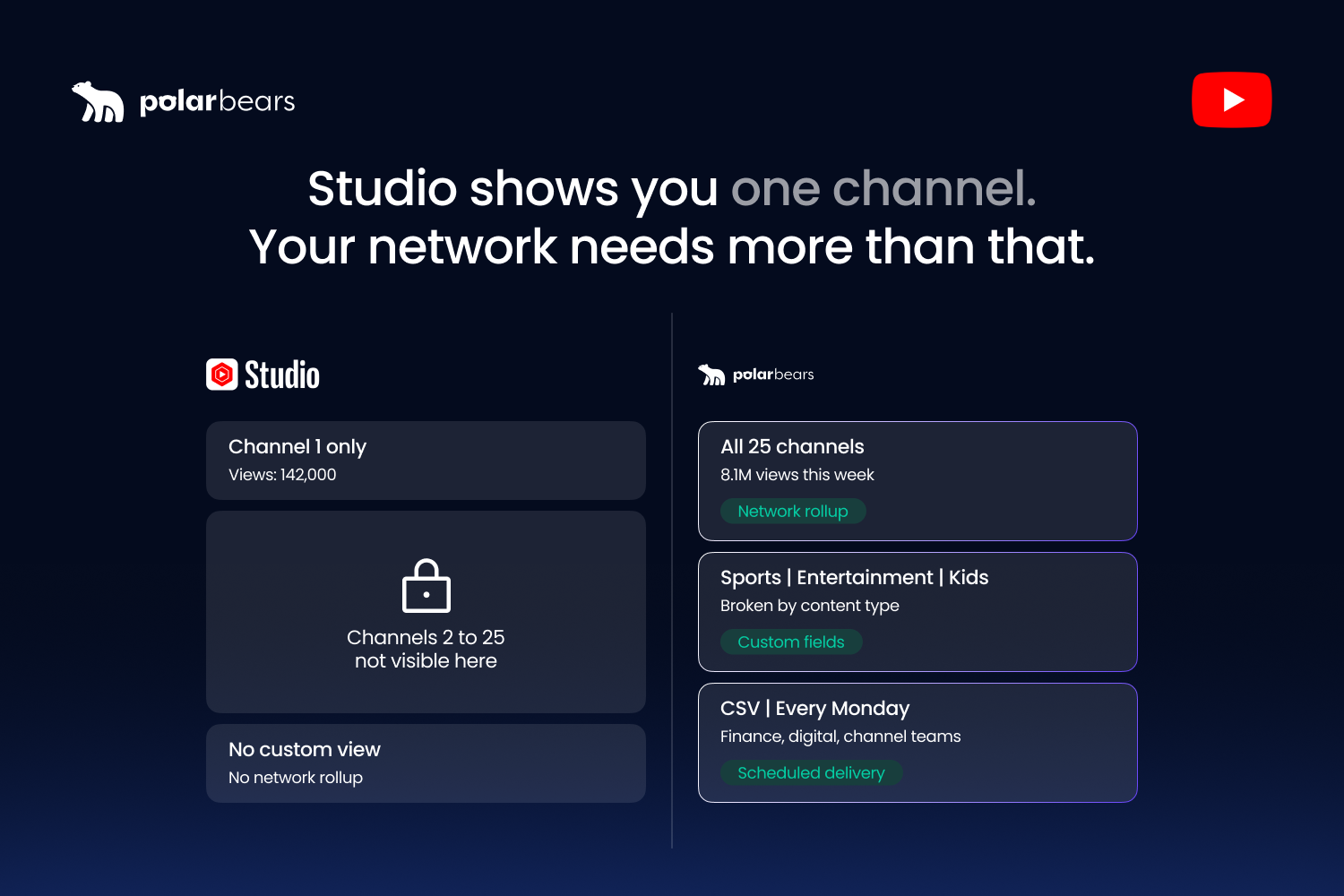
Say you are managing 25 channels for a UK broadcaster. Three sports-led, twelve entertainment, ten kids and family. Every Monday morning, the head of digital wants a portfolio-level view: which channels grew last week, which slipped, what the watch-time trend looks like across the network, and where the revenue is moving. Where does that report come from?
Not from YouTube Studio. Studio is siloed by channel. You log in, switch channel context, view the dashboard, screenshot or export the numbers, switch to the next channel, repeat. Twenty-five times. Then you build the rollup yourself in a spreadsheet. Then you do it again next Monday.
The three gaps that hurt most at scale are the same ones every operator hits. Studio has no portfolio rollup, so there is no single view that spans the network. Studio has no segment-based reporting across channels, so you cannot view all Spanish-language uploads or all sports highlights content as a group. Studio has no scheduled alerts to people who are not logged in, so anomalies and underperformance only surface when someone goes looking.
The time cost compounds. At 5 channels, teams typically spend 2 to 3 hours a week on manual aggregation. At 10 channels, 4 to 6 hours. At 25 channels, 10 to 15 hours. At 50 channels, the manual workflow stops being possible at all. Either someone full-time owns reporting, or reporting stops happening with any regularity.
There is a related point worth being honest about. Studio is genuinely good at single-channel inspection. The retention curve, the traffic source breakdown, the audience tab, the first-24-hour comparison, all of it is useful when you are sitting on one channel and want to understand what just happened. The problem is not Studio. The problem is that multi-channel operational reporting was never what Studio was built for, and trying to do that job inside Studio is what causes the pain.
What multi-channel reporting actually needs to deliver
Before deciding what to build or buy, it is worth defining the job. A working multi-channel reporting layer has to deliver five distinct outputs, and most systems fail because they cover one or two and ignore the rest.
The first is portfolio rollup. The executive view. Total views, total watch time, total revenue, subscriber growth, channel count, and direction of travel, all consolidated across the full network in one number-per-row table. This is the report finance and leadership actually read. It is never a dashboard they log into. It is a CSV in their inbox on Monday morning.
The second is per-channel detail. The drill-down. Underneath the rollup, every channel has its own row showing the same metrics for the same period, ranked so you can see which channels are pulling the network up and which are dragging it down. This is the report the head of digital uses for resource allocation: which channels need more investment, which need a content review, which are quietly compounding.
The third is segment views. The cross-channel slice. Performance broken down by content genre, by language, by territory, by upload format, long-form versus Shorts versus livestream, or by any other dimension that matters to the business. For a broadcaster running 25 channels across three content types, segment views are how you spot that the sports portfolio is up 18% while kids and family is down 6%, even when the overall network looks flat.
The fourth is trend over time. The forecasting layer. Not just last week's numbers, but a rolling 4, 12, and 52-week view showing whether the channels are accelerating, decelerating, or holding steady. Without trend data, every weekly report looks like a snapshot and the team loses its sense of where the network is heading.
The fifth is exception flags. The defensive layer. Anomalies and threshold breaches across the portfolio, surfaced before anyone has to go looking. Which channel had its worst week of the year. Which video underperformed against its 48-hour median by 60%. Which segment is trending down for the third consecutive month. For a deeper look at the metrics that drive these flags, our guide to the YouTube metrics that actually matter in 2026 covers each signal in detail.
A reporting layer that delivers all five jobs is doing the work CMS would do on the analytics side. This is the reporting layer we build and operate for the broadcaster, publisher, and media company clients we manage at The Polar Bears. What it cannot do is the rights and Content ID side, and that is the next thing to understand.
The API-based stack that replaces most of CMS
If you cannot get CMS but you need everything above, the stack that works in 2026 is API-based. Four components, configured to work together, and a layer on top that consolidates the outputs.
The first component is the YouTube Data API. This handles channel metadata, video lists, upload history, and the basic structural data about each channel in the network. It is free for normal usage volumes and has predictable rate limits.
The second is the YouTube Analytics API. This pulls the performance data: views, watch time, retention, CTR, traffic sources, audience demographics. It is the closest thing to a programmatic version of Studio Analytics, and it returns data at video level, channel level, or rolled up by whatever dimension you ask for.
The third is the AdSense Management API or the YouTube Reporting API, depending on monetisation status and access level. These pull the revenue side: estimated revenue, RPM, ad performance, payout-tier data. For multi-channel networks, the Content Owner reports through the Reporting API give the closest available equivalent to CMS-tier revenue rollups for partners who have that level of access.
The fourth is a custom orchestration layer that ties the three together. This is where the consolidation happens. Pull from each API on a schedule. Apply per-channel rules for fee structures, splits, and segmentation. Convert currencies if you operate across markets. Generate the rollup, the per-channel detail, the segment views, the trend lines, and the exception flags. Push the outputs to wherever they need to land: a CSV to finance, a Slack alert to the head of digital, a dashboard for the channel managers.
This stack can replicate the analytics side of CMS surprisingly well. Portfolio rollup, per-channel detail, segmentation, trends, exceptions, and revenue aggregation all work. What it cannot replicate is the rights side. Content ID administration, asset-level rights enforcement, copyright claim management, and the ability to monetise UGC uploads of content you own all live exclusively inside CMS. If you need that functionality, no API stack will replace it, and your only path is a CMS partner relationship through an MCN or rights management agency.
That is the honest gap. For pure performance reporting and revenue consolidation, the API stack closes the distance. For rights management at scale, it does not.
Build vs partner: the honest framing
This is the decision every operator hits sooner or later, and there is no universal right answer. The right answer depends on channel count, internal capability, capital, timeline, and whether the rights management gap is something you actually need to close.
Building the stack in-house tends to make sense in a specific set of conditions. You are managing 50 or more channels. You have a dedicated data or engineering team with the time and headcount to build and maintain it. You have the capital to spend somewhere between £50,000 and £200,000 on initial build, plus ongoing maintenance roughly equivalent to half a full-time engineer. You have a 6-month or longer runway before you need the reporting to be live. And your needs are unusual enough that off-the-shelf or agency options do not fit. When all five are true, building in-house gives you ownership, full customisation, and no ongoing per-channel fees.
Partnering with an agency tends to make sense in the opposite conditions. You are managing 5 to 25 channels and your network is not doubling next year. You do not have a dedicated data team and do not want to hire one. You need the reporting layer working in weeks rather than months. Your capital is better spent on content, talent, or distribution. And you would like the rights management piece included via the agency's CMS partner relationships rather than building those relationships yourself. When most of those are true, agency partnership typically runs £2,000 to £10,000 a month including the infrastructure, the reporting workflow, and the human ops team that runs it. The Polar Bears works with networks at the 5-to-50-channel scale on exactly this basis.
Neither path is universally right. The mistake operators make most often is committing to in-house builds without honestly accounting for the maintenance cost, then ending up two years in with a system that nobody owns and nobody trusts. The opposite mistake is committing to an agency without thinking about whether the network is going to outgrow that arrangement and need to be brought in-house later.
A useful way to test which side you are on: if a senior leader asked you today what the network's portfolio rollup looked like for last month, could you answer with a CSV in under an hour? If yes, your current stack is working. If no, the gap is the thing to solve, and it does not matter which path closes it as long as the path closes within your budget and timeline.
Building the multi-channel reporting layer
Whether you build in-house or partner with an agency, the operational requirements are the same. Five things matter more than anything else.
The first is portfolio rollup with drill-down. A working report has the executive view on top and the per-channel detail underneath, in the same document. Roll-up without drill-down is too vague to act on. Drill-down without roll-up loses the strategic picture.
The second is per-channel and per-segment thresholds. Every channel and every segment should have its own performance baseline. A 4% click-through rate is strong for an education channel and weak for a gaming channel, and a system that applies the same rule across both fires wrong alerts on both sides.
The third is scheduled delivery in the format each role actually uses. The head of the network wants a one-page summary. Finance wants a CSV. Channel managers want a daily alert when launch-window videos slip. None of them want a dashboard they have to log into. Build the system around the formats, not around the platform.
The fourth is access control that scales. Managing 25 channel logins is its own operational risk. Multi-factor authentication on every Brand Account. Contractor permission boundaries. Password rotation across the network. Deprovisioning when someone leaves. None of this is glamorous, but at 25 channels and multiple Brand Accounts, the security perimeter is a real surface area to defend.
The fifth is the audit trail. Every number on a report needs to trace back to its source. If revenue is reported as £18,400 for the kids and family segment last week, the system needs to show which channels contributed, which API call returned the data, what currency conversion was applied, and what date the data was pulled. Without that trail, the report becomes a black box and nobody trusts it.
At The Polar Bears, the reporting layer in our stack is powered by Vixxi, the platform we use to consolidate YouTube, Google Ads, and Google Ad Manager into one workflow. It handles the portfolio rollup, per-segment thresholds, scheduled CSV delivery, and the audit trail for the broadcaster, publisher, and media company clients we work with at the 5-to-50-channel scale. The specific tool matters less than the principles. What matters is that the reporting works, the numbers trace back to a source, and the head of digital can answer the question "how is the network performing this week?" without spending the morning in 25 separate Studio tabs.
FAQ
Can you manage multiple YouTube channels from one account?
Yes. A single Google Account can manage up to 100 YouTube channels through Brand Accounts, which is YouTube's standard way of separating channels from a personal Google identity. Each Brand Account can have multiple managers with different permission levels. For most networks running portfolios of channels, this is the standard setup, and it works well up to the 100-channel limit before requiring multiple Brand Accounts.
What is YouTube Content Management System (CMS)?
YouTube CMS is the platform's enterprise rights and channel management layer. It gives invited partners network-level analytics rollup, Content ID administration for copyright enforcement, bulk channel management, and rights-based payout reporting that standard YouTube Studio does not include. CMS is the system YouTube uses internally with multi-channel networks, major media companies, and large rights holders. It is not a feature ordinary accounts can enable.
How do you get access to YouTube CMS?
You do not apply directly. CMS access is invitation-only and granted either by YouTube to qualifying organisations or assigned through a certified CMS partner, typically an MCN or rights management agency. The eligibility criteria are not publicly published, but in practice access is reserved for organisations with significant copyrighted libraries, demonstrated rights ownership, and operational scale across multiple channels. Most operators managing 5 to 50 channels are not granted CMS regardless of revenue or subscriber count, and the practical path for them is either an agency partnership with CMS access or an API-based reporting stack that replaces the analytics side of what CMS would have provided. It is the approach we use at The Polar Bears for every network we manage.
Can you have more than one Brand Account on YouTube?
Yes. A single Google identity can own and manage multiple Brand Accounts, each of which can hold up to 100 YouTube channels. Networks at scale frequently run multiple Brand Accounts when their channel count exceeds the per-account ceiling or when they want to separate content portfolios for permission or operational reasons. The trade-off is that each Brand Account has its own login flow, its own permissions structure, and no native rollup view across multiple accounts. Multi-channel reporting stacks need to be built to handle that aggregation outside the platform.
How many YouTube channels can you manage under one account?
A single Google Brand Account can hold up to 100 YouTube channels. Once you cross 100, you need to create additional Brand Accounts. There is no published mechanism to raise the per-account ceiling, even for enterprise customers. Networks operating at over 100 channels run across multiple Brand Accounts and consolidate reporting outside the platform.
What is the best way to report analytics across multiple YouTube channels?
For networks managing more than five channels, the most workable approach is an API-based reporting stack built on the YouTube Data API, YouTube Analytics API, and AdSense Management API or YouTube Reporting API, with a custom orchestration layer that pulls the data, applies per-channel rules, and delivers scheduled reports to the people who need them. The stack can replicate the analytics side of CMS for portfolio rollup, per-channel detail, segment views, trend tracking, and exception flagging. What it cannot replicate is Content ID and rights management, which remain exclusive to CMS partners. The build versus partner decision depends on channel count, internal engineering capacity, and timeline. It is the approach we use at The Polar Bears for every network we manage.
Want multi-channel YouTube reporting that works at the scale you actually operate?
If you liked that why not take a look

Copyright Claims vs Strikes: What Brands and Broadcasters Need to Know
Copyright claims and strikes are not the same thing. What each does to your channel, when to dispute, and how brands manage copyright risk at scale.
YouTube Content ID Explained: How Rights Holders Protect and Monetise Their IP
What YouTube Content ID is, who gets access, and how rights holders use it to protect and monetise content. Payouts, policies and pitfalls explained.
What Security and Compliance Should a YouTube Agency Have?
Your agency holds your accounts and data. What SOC 2, ISO 27001, GDPR and Cyber Essentials actually mean, and what to ask before you sign.
Should Your YouTube Agency Work With Your Competitors?
Your agency might run your rival's channel too. Why agency conflict of interest matters, how good agencies keep competing clients apart, and what to ask.
What Should a YouTube Agency Put in Writing?
Most YouTube agencies dodge written commitments. What a good agency should promise: response times, reporting cadence, and fixing underperforming videos.
What Data Can You Take When You Leave a YouTube Agency?
Can you take your analytics, dashboards and custom reports when you leave a YouTube agency? What data is yours, what is not, and how to avoid lock-in.

Ready to maximise your YouTube revenue?
Get in touch and let’s begin exploring your channel’s hidden potential.