How to Catch Underperforming YouTube Videos Before They Cost You Revenue

How to Catch Underperforming YouTube Videos Before They Cost You Revenue
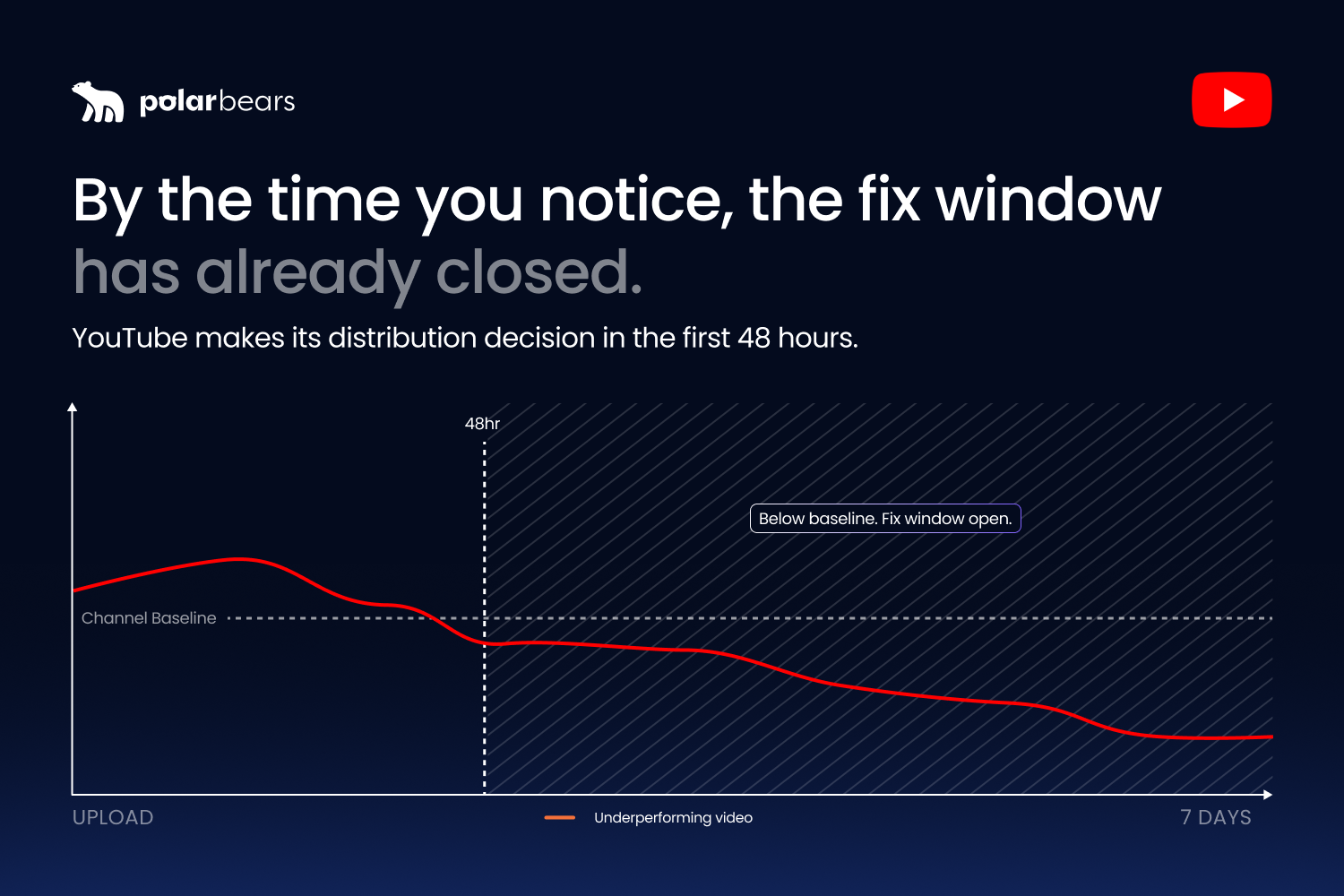
Most YouTube videos either move in the first 48 hours or they never move at all. The cost of finding out too late is rarely measured in one video's lost ad revenue. It's measured in the recommendation surface that video never reached, the channel-level signal it dragged down, and the next three uploads that inherited the same problem because nobody spotted it.
An underperforming video is one falling clearly below your own channel's baseline on click-through rate, retention, and watch time inside its launch window. Catching that pattern fast is the difference between a low-impact miss and a compounding loss across the channel. This guide walks through how to define the threshold properly, how to detect the drop while you can still act on it, and what to actually do when an alert fires.
If you run more than a handful of channels, this is the work that quietly determines whether the network grows or stalls.
What "underperforming" actually means for a channel
The first job is defining the threshold properly, because most operators get this wrong.
Absolute view counts are the wrong measure. A video pulling 5,000 views in 48 hours might be a smash on a niche education channel and a complete failure on a sports highlights channel built to do six figures per upload. The view number on its own tells you nothing. What matters is how the video is tracking against the channel's own baseline, against the forecast you had for the upload, or against a benchmark group of comparable videos.
There are four threshold approaches operators use in 2026. Two of them work reliably and two don't.
The first is comparing each new upload against the channel's recent average for the same format. A 12-minute Premier League highlights video gets measured against the channel's last 10 Premier League highlights videos, not against the channel as a whole. This works because format matters more than topic for early performance.
The second is comparing against a forecast set before upload. If the team thinks a video should pull 50,000 views in 48 hours based on the topic, the publishing window, and the audience signal, the forecast becomes the benchmark. Hitting 18,000 means something is broken. Hitting 75,000 means something is working.
The third is comparing against a benchmark group of similar channels. This is harder because the data is usually private, but agencies and tools like Tubular Labs make this possible at scale. It is useful for category sense-checks but slow as an alerting trigger.
The fourth is the absolute floor: a fixed view or revenue number below which the video gets flagged. This is the least reliable. Floors break the moment your channel grows, shrinks, or shifts category mix.
A practical definition that holds up: a video is underperforming if, by the end of its first 48 hours, it sits clearly below the channel's recent median for the same format on at least two of CTR, retention, and watch time. That is a heuristic operators actually use, not an official YouTube threshold.
The 48-hour decision window
Threshold matters, but timing matters more. The data on early performance signals is consistent across multiple recent sources, and it points to the same window.
According to Hashmeta's 2026 analysis of how the YouTube algorithm works, YouTube makes its critical distribution decisions in the first 48 hours after upload. Videos that flop in that window rarely recover. The platform has effectively categorised the video as low-performing and reduced the impressions it shows to the next audience tier. No amount of promotion later reverses that signal.
Subscribr's research on early-window video data shows the same thing from the analytics side. View velocity, audience retention, and CTR in the first 24 to 72 hours predict the trajectory of the video for the next 30 days. Strong early signals trigger wider distribution. Weak early signals trigger throttling.
Onewrk's 2026 guide to the algorithm confirms the same pattern. The homepage algorithm particularly favours content with strong initial engagement in the first 24 to 48 hours after upload. Engagement in that window receives broader distribution. Outside the window, the cost of intervention rises sharply.
That doesn't mean every video gets decided in 48 hours. Search-led content and evergreen tutorials behave differently. Educational videos can keep accumulating views via search for months without ever needing a homepage push. But for content built for browse distribution and homepage recommendations, the 48-hour rule is real and operationally meaningful.
The practical implication is that effective alerting needs three checkpoints, not one. The 48-hour read is where you catch packaging failures (weak title, weak thumbnail, weak hook). The 7-day read is where you catch content-fit failures (topic landed but viewers didn't stay). The 30-day read is where you catch revenue-impact failures (RPM trending below channel benchmark). Each window calls for a different remedial action.
The metrics that flag a flop early (and the ones that mislead you)
Five metrics matter for early underperformance detection. The order matters too.
CTR (click-through rate) is the first signal because it shows whether the title and thumbnail are doing their job. A weak CTR means people are seeing the video in their feed or recommendations and choosing not to click. The packaging is the immediate fix. Strong CTR with weak retention is a worse signal than weak CTR with strong retention, because the algorithm cares about viewer satisfaction, not clicks.
Retention is the second signal because it shows whether the content delivered on the click. A video with 70% retention across the first 30 seconds is holding its audience. A video with 35% retention has lost over half its viewers before the content even starts. The drop-off pattern in the first 60 seconds is where most fixable problems show up.
Average view duration (AVD) is third because it tells you the absolute time viewers spent watching. A 30-minute video with 35% AVD generates more watch time than a 5-minute video with 80% AVD, and YouTube rewards absolute watch time over percentage retention. AVD matters most for revenue-led decisions, because more watch time means more ad-eligible impressions.
Watch time is the rolled-up signal across views and AVD. Total watch time is what the algorithm uses to decide whether to keep promoting the video, and it's the metric YouTube has explicitly named as the primary ranking signal.
RPM (revenue per thousand views) is the fifth signal and the one that gets noticed last but matters most for finance. A video with strong CTR and retention but unusually low RPM points to a different problem: ad placement, audience geography, advertiser interest in the category, or monetisation status. RPM alerts catch revenue-shape problems that view-based metrics miss.
The mistake operators make is reading these signals in isolation. CTR on its own can mislead. According to YouTube's official guidance on CTR, small CTR fluctuations are not necessarily meaningful, and CTR has to be interpreted with average view duration and retention together. The signal is the combination.
Category and format also change what "good" looks like. Humble&Brag's 2026 benchmarks for new channels flag the variance directly: a 4.5% CTR is strong for educational content and weak for gaming. A 200-view first 48 hours is a hit for a B2B SaaS channel and a disaster for a gaming channel. Without that category context, alerts fire on the wrong videos and silence on the right ones. For a deeper look at which numbers actually matter day to day, our guide to the YouTube metrics that matter in 2026 breaks down each signal in detail.
Why YouTube Studio doesn't tell you what you actually need to know
YouTube Studio is built for individual channel inspection, not multi-channel operational alerting. There are three specific gaps that operators with five or more channels hit immediately.
The first gap is threshold-based alerts. Studio shows you performance data, but it doesn't notify you when a video drops below a defined threshold. There is no "alert me when any video falls 50% below my channel's 48-hour median" setting. You have to log in, navigate to the video, and read the numbers yourself. For one channel that's manageable. For 25 channels and 47 videos a week, it's impossible to keep up with manually.
The second gap is the multi-channel rollup. Each channel's Studio is siloed. There is no native view that consolidates performance across a managed portfolio. If you're running 25 channels and you want to know which three are slipping this week, Studio gives you 25 separate dashboards to check. Brand Accounts and channel-switching help slightly but don't solve the rollup problem.
The third gap is custom segmentation. Studio can't alert you when "Premier League highlights content across all five sports channels" drops below target RPM, or when "Spanish-language uploads on the kids and family channels" underperform versus English-language uploads. The segments don't exist in Studio. You can build them in Advanced Mode for individual channels, but not at the network level and not as alert triggers.
There is one related point worth being honest about. Studio is genuinely good at single-channel performance inspection once you know where to look. The first-24-hour comparison, the retention curve, the traffic source breakdown, the audience tab — all of it is useful. The problem is not the data. The problem is that operational alerting needs a different system layered on top.
What multi-channel content alerts actually look like
Say you're managing 25 channels for a UK broadcaster. Three sports-led, twelve entertainment, ten kids and family. You uploaded 47 videos last week. How many of them quietly underperformed?
Without alerting, the answer is "you don't know until Monday morning, and by then most of them are past the 48-hour fix window." With alerting, the answer arrives in your inbox at 8am the morning after upload, ranked by severity, with the metric that triggered the alert and the channel context attached.
An effective multi-channel alerting system has four characteristics.
It runs at both channel level and video level. Channel-level alerts catch broad slippage: the kids and family channel is down 15% on weekly watch time versus its trailing four-week average. Video-level alerts catch specific underperformers: this video published Tuesday is 63% below the channel's 48-hour CTR median. Both layers matter, and one without the other misses things.
It combines thresholds with anomaly detection. Threshold rules catch the obvious misses (any video below 40% of channel median on CTR after 48 hours). Anomaly detection catches the subtle ones (this channel has a statistically unusual drop in watch time this week even though absolute numbers look fine). Operators who use only one of the two miss the alerts the other would have caught.
It alerts on multiple metrics, not one. The strongest alert systems trigger on combinations: weak CTR with weak retention is more urgent than weak CTR alone. Strong CTR with collapsing retention signals a deceptive package and needs fixing fast. Single-metric alerts produce too much noise and miss the patterns that actually matter.
It supports custom segmentation. The kids and family content has different benchmarks from the sports highlights. The Spanish-language uploads compare against each other, not against English-language. Channel-level rules need to flex by segment, otherwise alerts fire on the wrong content and miss the right ones.
The escalation logic also matters. Launch-window videos in their first 48 hours get faster escalation than evergreen library videos that have been live for months. A library video drifting down on weekly views is a different problem from a freshly published video failing in its launch window, and the response timeline should reflect that.
The re-optimisation playbook (and what not to touch)
When an alert fires, the temptation is to act fast and act on everything at once. That's where most operators damage their own data.
The standard remedial action set in 2026 is well documented. Thumbnail and title rewrites are first-line for CTR problems. Description and chapter cleanup is the second-line action when search traffic is part of the mix. End screens and internal-link changes recover session time on videos that are losing viewers at the end. Refresh re-uploads (republishing as a fresh upload) are the high-risk option, used only when the original has a fundamental problem worth resetting.
The mistakes that destroy data are equally well documented. ClickMinded's 2026 case study analysis names four specific traps operators consistently fall into.
The first is refreshing a video that wasn't underperforming in the first place. If impressions are steady and CTR is healthy, there is nothing broken. Changing the thumbnail introduces noise without an upside, and if the new version performs worse, you've replaced something that was working.
The second is changing thumbnail, title, description, and tags all at once. Changing multiple variables in a single pass means you cannot tell which change made the difference. You end up with a result and no clear information about why. The discipline is to change one element, wait, measure, then change the next.
The third is refreshing the same video repeatedly inside a short window. YouTube's recommendations run on accumulated engagement signals, not on your most recent edit. Frequent edits inside seven to fourteen days fragment whatever signal the video had built. Wait at least one to two weeks between attempts on the same video.
The fourth is expecting metadata changes alone to fix a retention problem. If viewers are leaving at the 22-second mark because the intro is weak, no thumbnail swap will rescue the watch time. Retention problems are content problems and need editing-suite solutions, not optimisation-tab tweaks. For a deeper read on the discipline that separates YouTube optimisation from full channel management, the two are easy to confuse but the day-to-day work is different.
The diagnostic chain that holds up is simple. Weak CTR with healthy retention means the package is wrong — rewrite the title or redo the thumbnail. Healthy CTR with weak retention means the content didn't deliver the promise the package made. Both weak means the topic itself may not be right for the channel. The order of the diagnosis prevents wasted effort on the wrong fix.
Building the alerting layer into your workflow
If you are setting up content alerting for the first time or replacing an existing system, four things matter more than anything else.
The first is per-channel and per-segment threshold configuration. Every channel and every content segment should have its own baseline. A 4% CTR rule applied across all 25 channels will fire too often on some and not at all on others. The system needs to learn each channel's median and alert on deviations from it.
The second is multi-metric trigger logic. Single-metric alerts produce noise. Combinations of metrics surface the patterns that actually matter, and they reduce alert fatigue across the team.
The third is scheduled delivery in the format each role uses. Channel managers want a daily morning email with the previous day's launch-window flags. Heads of digital want a weekly rollup showing portfolio health. Finance wants a monthly underperformance report with revenue impact attached. The alerts need to land in inboxes, not dashboards nobody opens.
The fourth is the audit trail. Every alert should be traceable. Which threshold fired, on which channel, on which day, against what baseline. Without that trail, alerts get ignored because nobody can verify they're real.
At The Polar Bears, the alerting layer in our stack is powered by Vixxi, the platform we license to monitor performance across the YouTube, Google Ads, and Google Ad Manager data we manage. For the broadcaster and publisher clients we manage, it handles per-channel thresholds, multi-metric triggers, custom segmentation, and scheduled CSV delivery. The specific tool matters less than the principles. What matters is that underperformers get caught while they can still be fixed, not after they've already cost the network revenue.
FAQ
Should you delete underperforming YouTube videos?
Usually no. Deleting a video removes its accumulated watch time from your channel and can hurt your overall channel signal more than the underperforming video was hurting it. The exception is content that violates platform policies, contains outdated harmful information, or sits massively below the channel's average and has zero recovery potential. For most cases, the better action is unlisting (which keeps the watch time but removes the video from discovery) or leaving the video published and trying a re-optimisation pass first.
How do you measure YouTube channel performance?
Channel performance in 2026 is measured across five interlocking signals: watch time, average view duration, click-through rate, retention curve shape, and revenue per thousand views. Subscribers and view counts are lagging indicators rather than active performance signals. Effective measurement compares each new video against the channel's own baseline for the same format, not against absolute industry benchmarks that ignore channel context.
How do you know if your YouTube channel is doing well?
A YouTube channel is doing well when its uploads consistently meet or exceed the channel's recent median performance on CTR, retention, and watch time, and when its monthly views are trending up or stable across a rolling 90-day window. A single underperforming video does not mean the channel is failing. A pattern of three or more consecutive uploads sitting below baseline is the signal that something structural needs attention, whether that's packaging, content fit, or audience drift.
What does it mean to optimise a YouTube video?
Optimising a YouTube video means improving the elements that drive discovery and viewer satisfaction without changing the underlying content. The primary optimisation levers are the title, thumbnail, description, tags, chapters, end screens, and cards. Re-optimisation means applying those changes to a video that's already live, typically in response to weaker-than-expected performance. The goal is to lift CTR and retention so the algorithm tests the video with a wider audience.
How long does it take to know if a YouTube video is failing?
For most browse-led content, the first 48 hours after upload is the decision window. Videos that flop in the first 48 hours rarely recover through algorithmic distribution. For search-led and evergreen content, the window extends to 7-14 days because accumulated search and suggested traffic takes longer to materialise. The right approach is to monitor at three checkpoints: 48 hours for packaging failures, 7 days for content-fit failures, and 30 days for revenue-impact failures.
When should you re-upload a YouTube video?
Re-uploading a video as a fresh upload is a high-risk action and should be a last resort. The video loses its accumulated watch time, comment history, and any algorithmic signal it had built. Re-upload is justified when the original has a fundamental problem worth resetting (wrong audience targeting, irreparable thumbnail or title that's been changed too many times, or unfixable metadata) and the topic still has genuine demand. For most underperformers, a re-optimisation pass on the existing video performs better than a re-upload.
Want a content alerting system that catches underperformers before they cost real revenue?
If you liked that why not take a look

Copyright Claims vs Strikes: What Brands and Broadcasters Need to Know
Copyright claims and strikes are not the same thing. What each does to your channel, when to dispute, and how brands manage copyright risk at scale.
YouTube Content ID Explained: How Rights Holders Protect and Monetise Their IP
What YouTube Content ID is, who gets access, and how rights holders use it to protect and monetise content. Payouts, policies and pitfalls explained.
What Security and Compliance Should a YouTube Agency Have?
Your agency holds your accounts and data. What SOC 2, ISO 27001, GDPR and Cyber Essentials actually mean, and what to ask before you sign.
Should Your YouTube Agency Work With Your Competitors?
Your agency might run your rival's channel too. Why agency conflict of interest matters, how good agencies keep competing clients apart, and what to ask.
What Should a YouTube Agency Put in Writing?
Most YouTube agencies dodge written commitments. What a good agency should promise: response times, reporting cadence, and fixing underperforming videos.
What Data Can You Take When You Leave a YouTube Agency?
Can you take your analytics, dashboards and custom reports when you leave a YouTube agency? What data is yours, what is not, and how to avoid lock-in.

Ready to maximise your YouTube revenue?
Get in touch and let’s begin exploring your channel’s hidden potential.