YouTube Live Streaming: A Complete Guide for YouTube Channels

YouTube Live Streaming: A Complete Guide for YouTube Channels
37% of social media users watch live video at least once a month. For channels, live streaming is the fastest way to build real-time connection with an audience, surface content to new viewers, and create moments that feel urgent in a way pre-recorded video never can.
YouTube Live is consistently underused compared to Instagram Live and TikTok Live, which means there is less competition for attention on the platform that actually pays creators properly. Channels that stream regularly build loyal audiences who show up specifically for the live experience, and that loyalty transfers to higher engagement across everything else they publish.
Eligibility and setup
Any verified YouTube channel can go live. Verification requires a phone number and takes up to 24 hours for first-time streamers. You also need a clean record, no live streaming restrictions in the past 90 days and compliance with YouTube's community guidelines. Age minimum is 16.
Three ways to go live: directly from the YouTube app on mobile, through YouTube Studio on desktop using a webcam, or through encoding software like OBS Studio or Streamlabs for more control over production quality, graphics, and multi-camera setups.
Mobile works for casual Q&As, behind-the-scenes content, and quick updates. Desktop or encoder-based streaming is better for anything where you want professional overlays, screen sharing, or multiple video sources, which for most media companies and broadcasters is the more relevant setup.
Equipment: what you actually need
For a basic stream: a laptop or recent smartphone, a stable internet connection with a minimum of 10 Mbps upload speed, ideally 20 or above, and a decent microphone. Audio quality matters more in live streaming than in pre-recorded content because viewers cannot rewind and relisten to something they missed.
For a professional stream: add a dedicated camera or high-quality webcam, a ring light or softbox for consistent lighting, OBS Studio for scene switching and overlays, and a wired ethernet connection rather than WiFi. WiFi drops kill live streams and damage credibility faster than almost anything else.
You do not need a broadcast studio to start. Clean background, good lighting, clear audio, and a stable connection cover 90% of what matters. The remaining 10% is branding overlays and multi-camera angles, which are worth investing in once you have established a regular streaming cadence.
Why live streaming matters for channels
Pre-recorded content is polished. Live content is real. Viewers know the presenter cannot edit out mistakes or reshoot a section that did not land. That transparency builds audience trust faster than produced content can, which is particularly valuable for media companies trying to convert casual viewers into loyal subscribers.
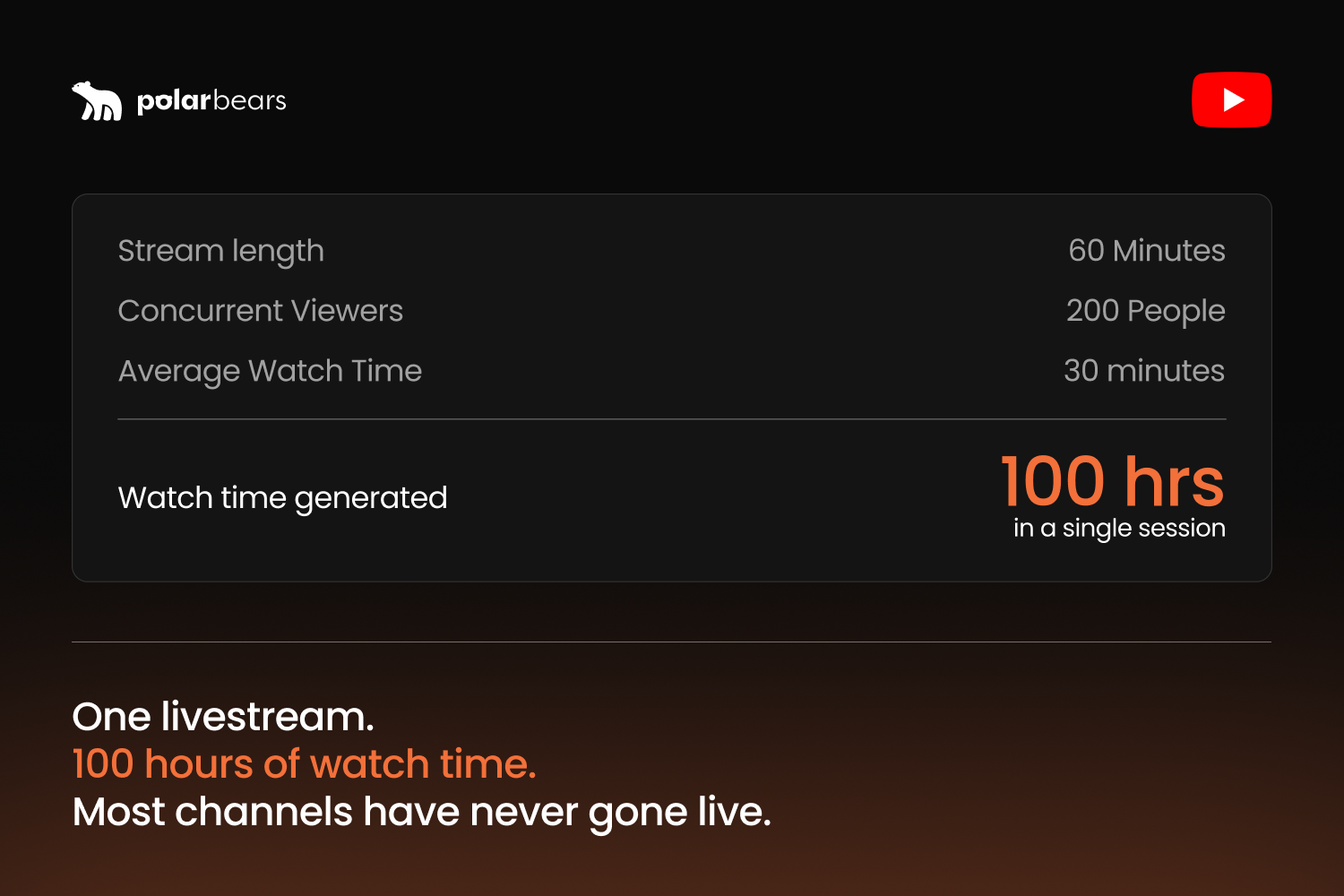
Live streams generate watch time that YouTube's algorithm values heavily. A 60-minute stream where 200 people watch for an average of 30 minutes generates 100 hours of watch time in a single session. For channels pushing toward monetisation or trying to accelerate algorithmic reach, regular streaming compounds those efforts significantly.
Engagement during live streams is also fundamentally different from engagement on regular uploads. Chat interaction creates a two-way conversation that passive viewing does not. Viewers who participate in live chat develop a connection to the channel and the community that is far harder to build through standard video publishing alone. Those viewers become your most consistent audience.
Types of live content that work for media channels
Q&A sessions are the simplest entry point. Announce a time, pick a topic relevant to your audience, and answer questions live. No script needed. No production overhead. The value comes from the interaction itself and the signal it sends to the algorithm that your channel is actively engaging its audience.
Premiere events work particularly well for media companies with archive content or new releases. Schedule a live premiere for a new episode, a documentary, or a best-of compilation. Viewers watch together in real time, the chat creates a communal experience, and the content lives on as a VOD afterwards with ads running against all future views.
Behind-the-scenes streams are an underused format for broadcasters and publishers. Show how content gets made, introduce the team, walk through the production process. Audiences who see the people and the process behind a channel develop stronger loyalty than those who only ever see the finished output.
Live panel discussions and expert interviews position your channel as an authority in your space. For media companies with access to talent, contributors, or subject matter experts, a regular live interview format creates appointment viewing that keeps subscribers coming back on a predictable schedule.
Pre-recorded livestreams: the format most channels ignore
This deserves its own section because it is the highest leverage opportunity available to media companies on YouTube and the one almost nobody is using properly.
A pre-recorded livestream is existing content, a compilation, an archive programme, a best-of series, scheduled to broadcast as a live event on YouTube. To the algorithm it registers as a livestream. To viewers it appears in the live section of the platform and can be watched as it plays. Once it ends it sits on the channel as a standard VOD.
For broadcasters and publishers sitting on years of archive content, this is a way to be present on YouTube around the clock without a single person sitting in front of a camera. The loop format takes it further. The same content scheduled to replay continuously means the channel always shows as live, with the algorithm treating it favourably and new viewers discovering it at any hour.
The practical setup requires only a streaming tool like Restream or Streamyard and a compiled video file. The return in algorithmic favour and organic reach relative to the effort involved is as good as anything else available on the platform right now.
Monetisation during live streams
Super Chat and Super Stickers let viewers pay to have their messages highlighted during the stream. For channels in the YouTube Partner Programme this creates direct revenue during the broadcast itself.
Super Thanks allows viewers to leave paid tips on the stream after it ends. Channel memberships, unlocked at 500 or more subscribers in the Partner Programme, give viewers recurring monthly access to member-only perks, badges, and emojis.
Live streams also count toward regular ad revenue once archived as VODs. A stream that gets 10,000 views during the broadcast might accumulate another 50,000 views over the following months, with ads running against every one of those future views.
Common mistakes that undermine live streams
Not promoting in advance. Going live and hoping viewers show up does not work. Schedule the stream so it appears in subscriber notifications and on the channel page. Promote it across your other channels and in community posts at least 48 hours ahead.
Poor connection stability. A stream that buffers, freezes, or drops entirely damages channel credibility more than not streaming at all. Test the connection before every stream. Use wired ethernet where possible and have a mobile hotspot as a backup.
Ignoring the chat. The point of live is interaction. A presenter reading from a script without acknowledging the chat is making a pre-recorded video in the least efficient way possible. If chat volume is high, assign a moderator to surface the best questions and comments throughout the stream.
Treating live as a one-off. The channels that benefit most from live streaming are the ones that do it consistently. A regular streaming schedule, even once a fortnight, builds an audience that knows when to show up. Sporadic streams with no pattern never build the same kind of loyal viewership.
At The Polar Bears, live streaming is built into the distribution workflow for the channels we manage. For media companies and broadcasters with existing content libraries, the combination of pre-recorded livestreams and occasional live programming represents one of the highest return investments available on the platform right now with the resources most teams already have.
If you liked that why not take a look

Copyright Claims vs Strikes: What Brands and Broadcasters Need to Know
Copyright claims and strikes are not the same thing. What each does to your channel, when to dispute, and how brands manage copyright risk at scale.
YouTube Content ID Explained: How Rights Holders Protect and Monetise Their IP
What YouTube Content ID is, who gets access, and how rights holders use it to protect and monetise content. Payouts, policies and pitfalls explained.
What Security and Compliance Should a YouTube Agency Have?
Your agency holds your accounts and data. What SOC 2, ISO 27001, GDPR and Cyber Essentials actually mean, and what to ask before you sign.
Should Your YouTube Agency Work With Your Competitors?
Your agency might run your rival's channel too. Why agency conflict of interest matters, how good agencies keep competing clients apart, and what to ask.
What Should a YouTube Agency Put in Writing?
Most YouTube agencies dodge written commitments. What a good agency should promise: response times, reporting cadence, and fixing underperforming videos.
What Data Can You Take When You Leave a YouTube Agency?
Can you take your analytics, dashboards and custom reports when you leave a YouTube agency? What data is yours, what is not, and how to avoid lock-in.

Ready to maximise your YouTube revenue?
Get in touch and let’s begin exploring your channel’s hidden potential.