YouTube Studio Limits at Scale: What Breaks at 5, 50, 500 Channels

YouTube Studio Limits at Scale: What Breaks at 5, 50, 500 Channels
YouTube Studio was built for one person managing one channel. That’s why every operational problem brand portfolios run into traces back to that original design choice.
The limits come in three layers.
- Hard technical limits YouTube publishes for individual videos and channels.
- Account-level ceilings that constrain how many channels you can run from one identity.
- Structural limits nobody writes about until they hit it: Studio is a one-channel-at-a-time interface, and no amount of workflow discipline removes that constraint.
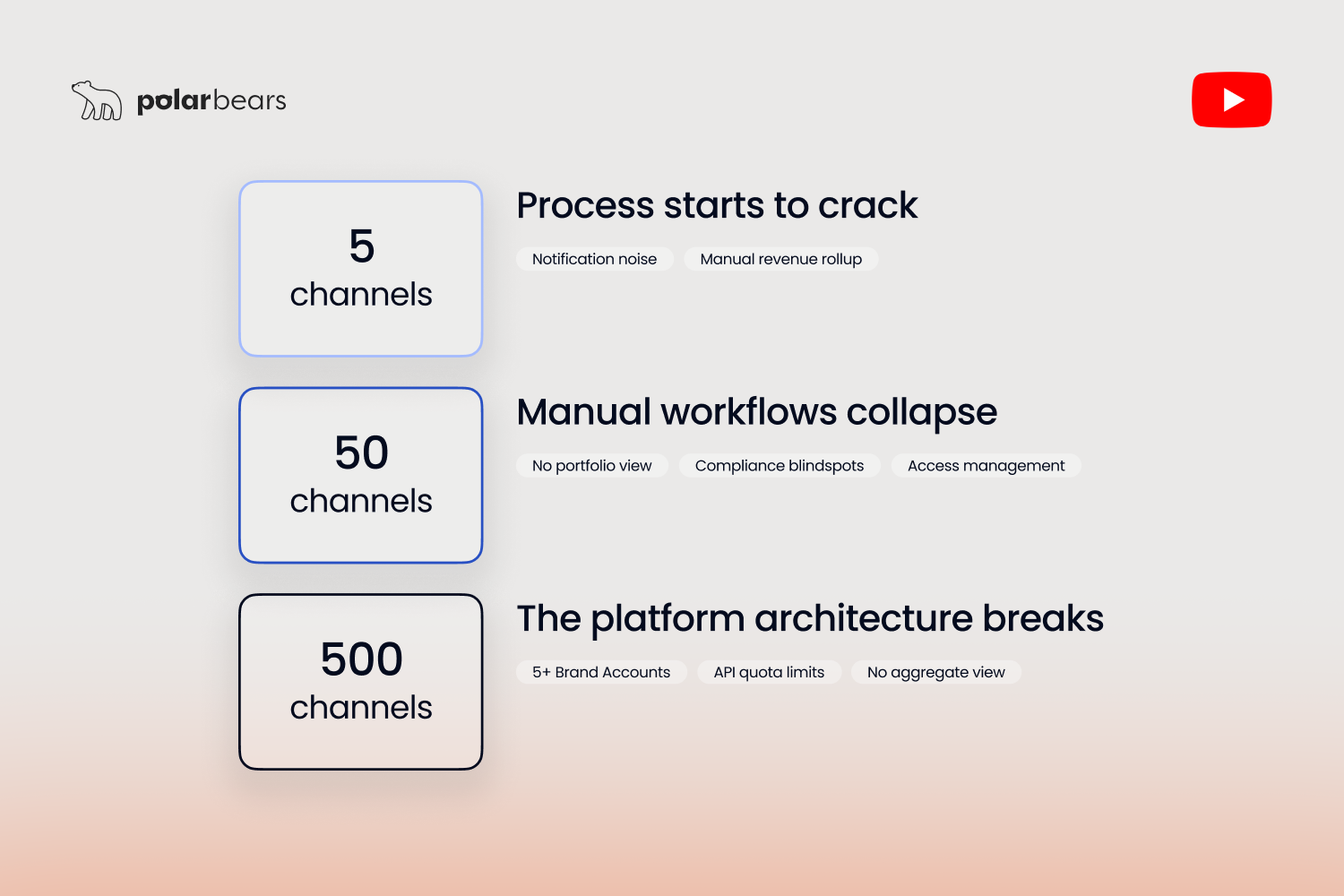
This guide walks through what each layer actually looks like, and what specifically breaks at three scale tiers: 5 channels, 50 channels, and 500 channels. The pain at each level is different and the fixes are different too.
The hard limits YouTube actually publishes
Some of these you already know. Others catch teams off-guard the first time they hit one.
For individual videos, the published limits are clear. YouTube Help confirms the maximum upload size is 256GB or 12 hours of runtime, whichever you hit first. If your file exceeds 256GB, YouTube's official guidance is to compress with the H.264 codec before upload. The recommended container is MP4. Titles cap at 100 characters. Descriptions cap at 5,000 characters. Custom thumbnails are limited to 2MB per file.
For new and unverified accounts, video length caps at 15 minutes by default. Verified accounts can upload up to the 12-hour maximum. Verification itself is a manual process inside Studio that takes minutes, but the cap exists because YouTube treats unverified accounts as a fraud surface.
Daily upload counts are more variable. New accounts face stricter limits, typically in the 10-15 video range per day. Verified accounts with established history can upload significantly more, with operator reports putting the practical cap around 100 videos in the first 24 hours after verification and roughly 50 per 24 hours after that. These are not published in a single Help article. They surface in support threads, developer documentation, and bulk-upload tool documentation. Treat them as platform behaviour rather than guaranteed thresholds.
These are the floor. Every channel hits them. They're rarely the problem at scale.
The account-level ceilings that catch you off-guard
The harder limits sit above the channel level. They're the ones operators don't think about until they're three months into a network expansion and suddenly the maths stops working.
The first is the Google Brand Account ceiling. Google's own documentation confirms that a single Google Account can manage up to 100 YouTube channels through Brand Accounts. This is a hard cap. There is no enterprise tier that raises it, no published upgrade path, no negotiation. At 100 channels you've hit the ceiling. At 101 you need a second Brand Account, and everything that comes with that decision: separate logins, separate permissions, separate identity surfaces for MFA, separate audit trails.
The second is the YouTube Data API v3 quota. Google Developers documentation confirms the default quota allocation is 10,000 units per day per Google Cloud project. Each API call costs a specific number of units. A simple read operation like `channels.list` costs one unit. A write operation like `channels.update` costs 50 units. The big one is `videos.insert`, used to upload a video via the API. It costs 1,600 units. That means a single API project can upload roughly six videos per day before hitting the daily ceiling. For automated bulk publishing across a 50-channel network, that's not enough.
Quota extension is possible. Google's published process requires submitting an audit request that covers your use case, your compliance with YouTube's API Services Terms of Service, and your handling of user data. The audit can take weeks. It can be denied. Most agencies operating at scale run multiple Google Cloud projects to spread the quota load rather than rely on a single extended quota.
The third is contractor and manager permissions. Brand Accounts support multiple managers with different role levels (Owner, Manager, Editor). The practical limit per channel is generous, but managing role assignments across 50 channels with a rotating contractor base becomes its own administrative discipline.
Scenario one: what breaks at 5 channels
Picture a UK kids and family content brand. They run five regional channels, one each for the UK, Ireland, Australia, New Zealand, and South Africa. Same content slate, localised intros, separate audience targeting per market. Combined upload schedule of around 12 videos per week.
At this scale, Studio still works as the primary interface. One Brand Account holds all five channels comfortably. The team has three people with manager access across the channels. Manual switching between channels takes a few clicks. There is no rollup view of how the five channels are performing together, but the weekly numbers fit comfortably into a single spreadsheet.
What hurts even at this scale is notification fragmentation. Each channel surfaces its own comments, its own policy notices, its own monetisation updates, its own Community Guidelines flags. Five separate notification streams compete for attention, and there is no Studio setting that consolidates them. Most teams either accept the noise or develop personal triage rules.
The other small pain point is revenue rollup. Each channel has its own AdSense linkage. Pulling consolidated monthly revenue means logging into each channel's analytics individually, exporting CSVs, and combining them outside of Studio. At 5 channels, this is a 30-minute weekly job. Most teams handle it without complaint.
The honest assessment at this tier: brands with 5 channels don't need agency support and they don't need custom tooling. They need a 30-minute weekly process and one person who owns the rollup spreadsheet. Studio is not the bottleneck yet.
Scenario two: what breaks at 50 channels
Now picture a UK broadcaster. They run 50 channels across entertainment, sports, kids, and news verticals. Some are owned outright. Some are managed for talent or partner brands. Combined upload schedule is around 80 videos per week. The digital team is six people, with channel managers split by vertical.
At this scale, Studio is no longer the system of record. It cannot be. The numbers don't allow it.
Manual switching between 50 channels is mathematically a part-time job. If a channel manager spends two minutes per channel per day on routine checks like comments, policy flags, and recent upload performance, that's 100 minutes per day, every day, just on Studio admin. None of it is productive work. All of it is overhead the platform creates by not consolidating the view.
The compliance picture is worse. Across 50 channels, the team needs to track Community Guidelines strikes, monetisation status changes, copyright claims, and Content ID disputes. None of these surface in a portfolio view in Studio. A single strike on a single channel can trigger demonetisation that affects revenue across the quarter, and if nobody spots it for a week because the notification got lost in the noise from 49 other channels, the cost is real.
Contractor offboarding becomes a security problem. When a freelance video editor leaves the team, removing their access from one channel takes a minute. Removing it from 50 channels takes an hour, and missing one creates a permission liability that survives indefinitely until someone audits the manager lists per channel.
The Brand Account ceiling matters here too. 50 channels still fits comfortably in one Brand Account, but most broadcasters at this scale are growing. Adding 10 channels a year takes them past the 100-channel ceiling within five years, and the planning for that needs to happen now, not when it triggers.
The fix at this scale is not a process improvement. It's a tooling decision. Either build an internal reporting and alerting layer on top of the Data API, or partner with an agency that already runs that infrastructure. By 50 channels, the question isn't whether Studio can handle the workload. The question is which non-Studio system is the actual operational backbone. For a detailed breakdown of the metrics that actually matter when you're tracking performance across that many channels, the metrics conversation deserves its own attention.
Scenario three: what breaks at 500 channels
Picture a multi-channel network. They manage 500 channels across owned content and affiliate creators. Combined upload schedule runs into the hundreds of videos per day. Operations sits across multiple time zones with a team that includes channel managers, editors, finance, compliance, and a dedicated platform ops function.
At 500 channels, Studio is structurally the wrong tool. The reasoning isn't subjective; it's arithmetic.
500 channels require at minimum five Google Brand Accounts to hold them, since each Brand Account caps at 100. In practice most MCNs run more than five, because grouping channels by content category, revenue tier, or geographic region creates cleaner permission structures. Each of those parent Brand Accounts is its own permission silo. Each one needs its own MFA flow. Each one needs its own audit log. Each one needs its own access list to be maintained as contractors and staff change.
There is no Studio interface that aggregates across Brand Accounts. There is no first-party YouTube dashboard that shows "all 500 channels at portfolio level." The interface assumes you operate one channel at a time, and the moment you cross 100 channels, you also operate across multiple Brand Accounts at the same time.
The API does most of what Studio cannot, but at this scale the API quota story matters. Default quotas of 10,000 units per day per project are insufficient for 500-channel reporting workflows. Most MCNs at this scale run multiple parallel API projects to spread the quota load, sometimes 10 or more, each with their own OAuth tokens and credentials to manage.
What enables 500-channel operations isn't tooling on top of Studio. It's CMS partnership for the rights management side (covered in our guide to multi-channel reporting without a CMS) and either an internal-built or agency-provided operational layer for everything else. The internal-built option typically requires a dedicated platform engineering team and 12-18 months of build time. The agency-partnership option compresses that to weeks.
The MCNs running at 500 channels successfully have one thing in common: they stopped treating YouTube as a single platform and started treating it as a portfolio of API endpoints and policy surfaces that require their own operational discipline.
The cascading failure modes nobody warns you about
Each operational area fails at a different scale. The mistake operators make is assuming one tool or one process fixes all of them.
Login and access starts to break around 10 to 25 channels. The friction is mostly MFA fatigue. If every login requires a phone-based prompt, and the team needs to access different channels through the day, the cumulative time cost is meaningful. The fix is either single sign-on (where supported) or a structured password vault with proper 2FA backup.
Notification noise breaks earlier, around 5 to 10 channels. Studio surfaces every comment thread, every policy notification, every Community Guidelines flag per channel separately. By 10 channels, important signals get lost in routine noise. The fix is a separate alerting layer (covered in our content alerts guide) that consolidates the signals worth acting on and ignores the routine.
Reporting and analytics breaks at 20 to 50 channels. Manual rollups stop being viable. The team starts to either skip rollups (and lose visibility) or spend a disproportionate amount of time producing them. The fix is API-based reporting feeding scheduled CSVs to the people who need them.
Compliance and audit breaks at 50-plus channels. Auditing every monetisation change, every policy strike, every Content ID claim manually becomes impossible. The fix requires a system that logs every change with a timestamp and a source. Studio doesn't do this natively across channels.
Contractor and team access breaks at 50 to 100 channels. Managing who has Editor versus Manager versus Owner access across many channels stops scaling without dedicated tooling. The fix is centralised role management, either via Google Workspace structures or via an external access layer that mirrors permissions back to Brand Accounts.
The pattern is consistent. Each of these has its own scale point and its own fix. Treating them as one problem leads to either overbuying tooling or underbuying it. The right approach is to map which one is hurting most and address that, then move to the next one in sequence.
What YouTube has actually built for scale (and what it hasn't)
YouTube has shipped useful improvements for multi-channel management over the last few years. It's worth being clear about what they cover and what they don't.
The Brand Account model itself is the foundation. Multiple managers per channel, role-based permissions, the ability to move channels between Brand Accounts (with caveats), mobile channel switching that's significantly better than it was in 2022. These are real and useful at small scale.
CMS, YouTube's content management system, is the enterprise tooling. It's invitation-only and reserved for MCNs, major media brands, music labels, and rights holders with significant copyrighted libraries. Where available, CMS gives network-level reporting, Content ID administration, and bulk operations that ordinary Studio cannot. Most brands managing 5–50 channels are not granted CMS regardless of revenue.
The YouTube Reporting API for content owners provides bulk analytics extraction. This is the official path for partners who need to pull large reports across multiple channels programmatically. It's the closest YouTube offers to enterprise analytics tooling.
The Data API supports programmatic operations across channels (uploads, metadata updates, comment management, playlist creation) at the quota cost discussed earlier.
What's still missing is the obvious thing: a first-party multi-channel command centre. A unified dashboard that shows all your managed channels at portfolio level. Consolidated notifications. Scheduled bulk operations without quota management. None of that exists inside Studio in 2026, and there's no public indication YouTube intends to build it.
The gap exists because Studio is genuinely designed for the single-creator use case. Multi-channel ops tooling lives in the API layer, in CMS, or in third-party tools built on top of YouTube. It never lives inside Studio itself.
Building the workflow YouTube doesn't give you
If you're operating at scale and Studio is no longer fit for purpose, three things matter when you build or buy the layer that sits above it.
The first is a portfolio view that aggregates Studio data without requiring Studio logins. Pull from the Analytics API on a schedule. Roll the numbers up by channel, by segment, by territory. Present the view in a format the team will actually open. Usually a scheduled CSV or a simple dashboard, not a tool nobody logs into.
The second is a scheduled reporting layer that lands in the right inboxes at the right time. The CEO wants a one-page weekly summary. Finance wants a monthly revenue CSV by the 12th. Channel managers want a Monday morning alert when launch-window performance slips. None of them want a dashboard to check. Build for the delivery, not the platform.
The third is access control that scales independently of YouTube's per-channel permissions. Centralised contractor onboarding and offboarding. Audit trails that show who had what access when. Permission boundaries that hold up even as channels move between Brand Accounts.
At The Polar Bears, the operational layer in our stack is Powered by Vixxi, the platform we license to consolidate YouTube, Google Ads, and Google Ad Manager into one workflow. For the broadcaster and publisher clients we work with, it sits above Studio and handles the portfolio view, scheduled reporting, and access management that Studio doesn't. The specific tool matters less than the principles. What matters is recognising when Studio has stopped being the right interface and committing to whatever layer replaces it.
FAQ
How many videos can you upload to YouTube per day?
For verified accounts in good standing, the practical daily upload cap is around 100 videos in the first 24 hours and roughly 50 per 24 hours afterwards. New and unverified accounts face stricter limits, typically 10 to 15 videos per day. These caps aren't published in a single official Help article and behave more like platform thresholds than fixed rules. Account age, history, and content category all influence what YouTube allows in practice. Bulk publishers operating at scale typically use the Data API rather than the Studio interface for uploads, which introduces its own quota constraints.
What is the YouTube Data API quota limit?
The default YouTube Data API v3 quota is 10,000 units per day per Google Cloud project. Each API call costs a specific number of units based on the operation. A simple read costs one unit, a metadata update costs 50, and a video upload costs 1,600. That means a single project can upload roughly six videos per day at default quota before hitting the ceiling. Quota extensions are possible through an audit request that reviews your use case and compliance with YouTube's API terms. Audits can take weeks and can be denied. Many teams operating at scale run multiple parallel projects rather than relying on a single extended quota.
Can you manage multiple YouTube channels from one account?
Yes. A single Google Account can manage up to 100 YouTube channels through the Brand Account system. Each Brand Account can have multiple managers with different permission roles (Owner, Manager, Editor). For most brand portfolios this is the standard setup and it works comfortably up to the 100-channel ceiling. Beyond that, you need additional Brand Accounts, each with its own logins, permissions, and audit surface. Switching between channels happens through YouTube's channel-switcher UI, which has improved significantly but still operates one channel at a time.
Is YouTube Studio the same as Creator Studio?
YouTube Studio is the current name. Creator Studio was the previous name, retired in 2018-2019 when the platform consolidated its creator tooling under the Studio brand. Functionally they refer to the same product. It is the back-end interface where you upload videos, manage metadata, check analytics, moderate comments, and configure monetisation. Some older articles, tutorials, and documentation still use "Creator Studio" interchangeably. If you're looking for current functionality, search for "YouTube Studio".
How do you increase the YouTube upload limit?
The first step is verifying your account, which raises the default 15-minute video length cap to the full 12-hour maximum. Verification happens inside Studio and takes only minutes once you provide a phone number. For daily upload counts, the practical caps lift as your account ages and builds a clean history with the platform. There is no published process to formally request a higher daily upload limit. If you're hitting it routinely, the issue is usually that you're running a publishing workflow Studio wasn't designed for, and the fix is moving bulk uploads to the Data API where you can manage the quota explicitly.
What is the upload size limit on YouTube?
The maximum single-file upload size on YouTube is 256 gigabytes or 12 hours of runtime, whichever you hit first. If your file is larger than 256GB, YouTube recommends compressing it with the H.264 codec before upload. The recommended container format is MP4. Files exceeding the size or duration limit will be rejected at the upload stage. For practical purposes, even high-resolution 4K content rarely approaches the size cap unless it's uncompressed.
Want YouTube ops that scale without breaking?
If you liked that why not take a look

Copyright Claims vs Strikes: What Brands and Broadcasters Need to Know
Copyright claims and strikes are not the same thing. What each does to your channel, when to dispute, and how brands manage copyright risk at scale.
YouTube Content ID Explained: How Rights Holders Protect and Monetise Their IP
What YouTube Content ID is, who gets access, and how rights holders use it to protect and monetise content. Payouts, policies and pitfalls explained.
What Security and Compliance Should a YouTube Agency Have?
Your agency holds your accounts and data. What SOC 2, ISO 27001, GDPR and Cyber Essentials actually mean, and what to ask before you sign.
Should Your YouTube Agency Work With Your Competitors?
Your agency might run your rival's channel too. Why agency conflict of interest matters, how good agencies keep competing clients apart, and what to ask.
What Should a YouTube Agency Put in Writing?
Most YouTube agencies dodge written commitments. What a good agency should promise: response times, reporting cadence, and fixing underperforming videos.
What Data Can You Take When You Leave a YouTube Agency?
Can you take your analytics, dashboards and custom reports when you leave a YouTube agency? What data is yours, what is not, and how to avoid lock-in.

Ready to maximise your YouTube revenue?
Get in touch and let’s begin exploring your channel’s hidden potential.